
Python Fundamentals Series · Part 10 of 12
Python #9: Functions & Memory Model Explained | Python for Beginners
Python Foundations · Part 5.6–6.1 of 23
Choosing a Data Structure, and How Functions Really Work
A simple framework for picking list, tuple, dict or set, then functions from first principles: parameters, return values, scope, recursion, and what Python builds in memory when you define and call one.

This part wraps up Section 5 by answering the question every beginner asks: which data structure should I use? (5.6). Then Section 6 begins with functions (6.1) and what happens in memory when you define and call them (6.1.1). That memory model is what makes closures and functional programming easy later, so don't skip it.
Warm-Up: The Tuple Puzzle
From the last part: a = 10, b = 20, t = (a, b), a = a + 1. Why does print(t) still show (10, 20)?
tholds labels pointing to theintobjects10and20.a + 1creates a new object,11, and moves the labelato it.- Integers, strings, floats and booleans are immutable, so the original
10never changes. The tuple's label still points to it.
This isn't about the tuple being immutable. It's simply how labels and objects work.
Part 5.6 — Which Data Structure to Choose?
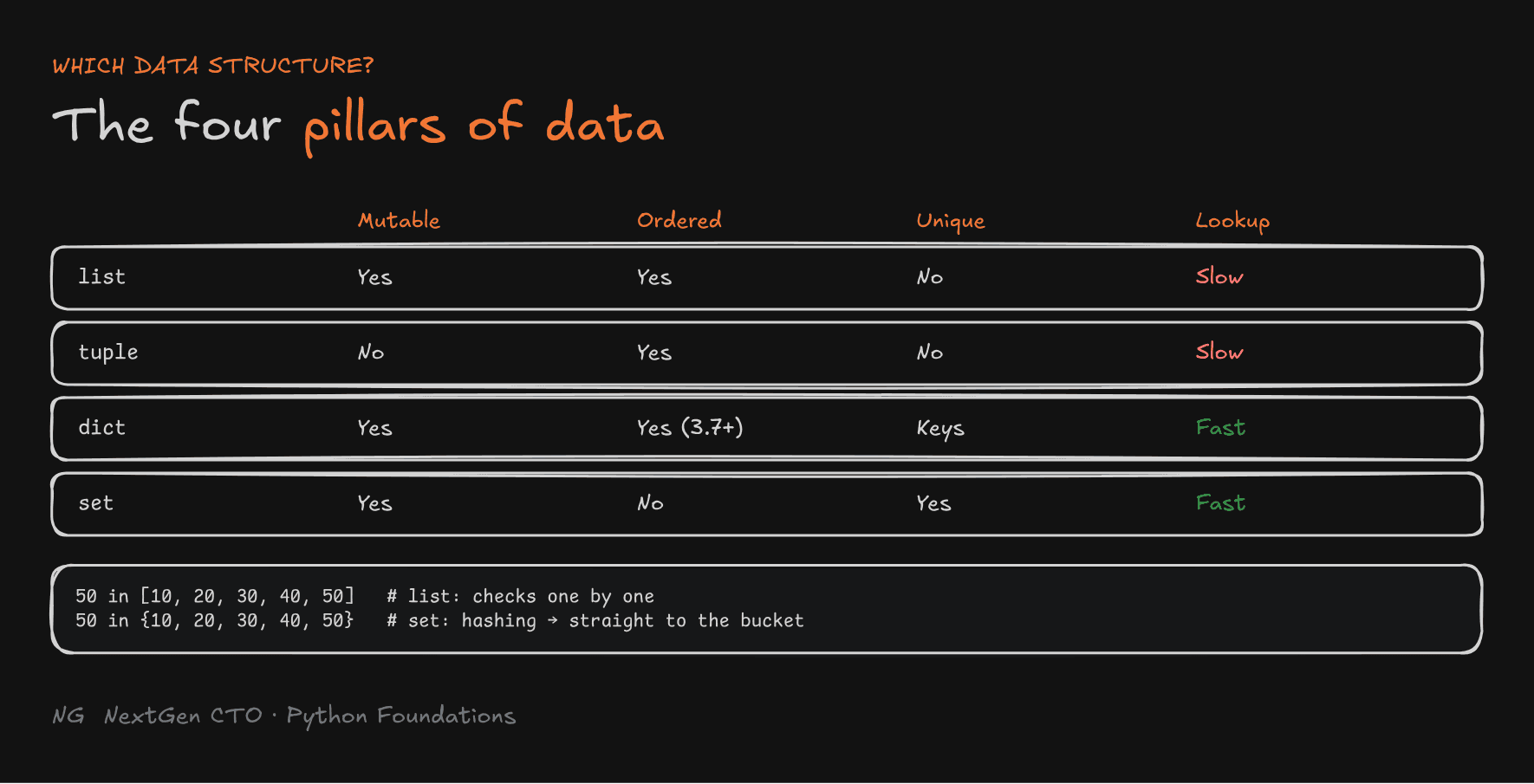
Python has four main collection types: list, tuple, dictionary and set. Each solves a different problem. Picking the right one makes your code faster, safer and easier to understand.
The Four Pillars of Data
Judge any collection on four properties:
- Mutability: can you add, remove or replace items?
- Order: does it keep the order you inserted items in?
- Uniqueness: are duplicates allowed?
- Lookup speed: how quickly can you find an item?
A dictionary looks best on paper, but if you only have values and no keys, a dictionary wastes space storing keys you'll never use.

Performance: Lookup Speed
Lists and tuples search item by item: "is the first one 50? the second?…" The time grows with the size of the collection.
Sets and dictionaries use hashing to jump straight to the right bucket, which is constant time on average, however big they grow.
numbers = [10, 20, 30, 40, 50]
unique_numbers = {10, 20, 30, 40, 50}

print(50 in numbers)          # True: scans the list
print(50 in unique_numbers)   # True: much faster for large data
If your program repeatedly checks membership, use a set. If you need fast lookups of values by key, use a dictionary.
Mutability as a Safety Feature
- Mutable (list, dict, set): use when the data must change.
- Immutable (tuple): use when the data must stay fixed. Pass a tuple anywhere and nobody can edit it. An attempt raises an error instead of silently corrupting your data.
The Decision Framework
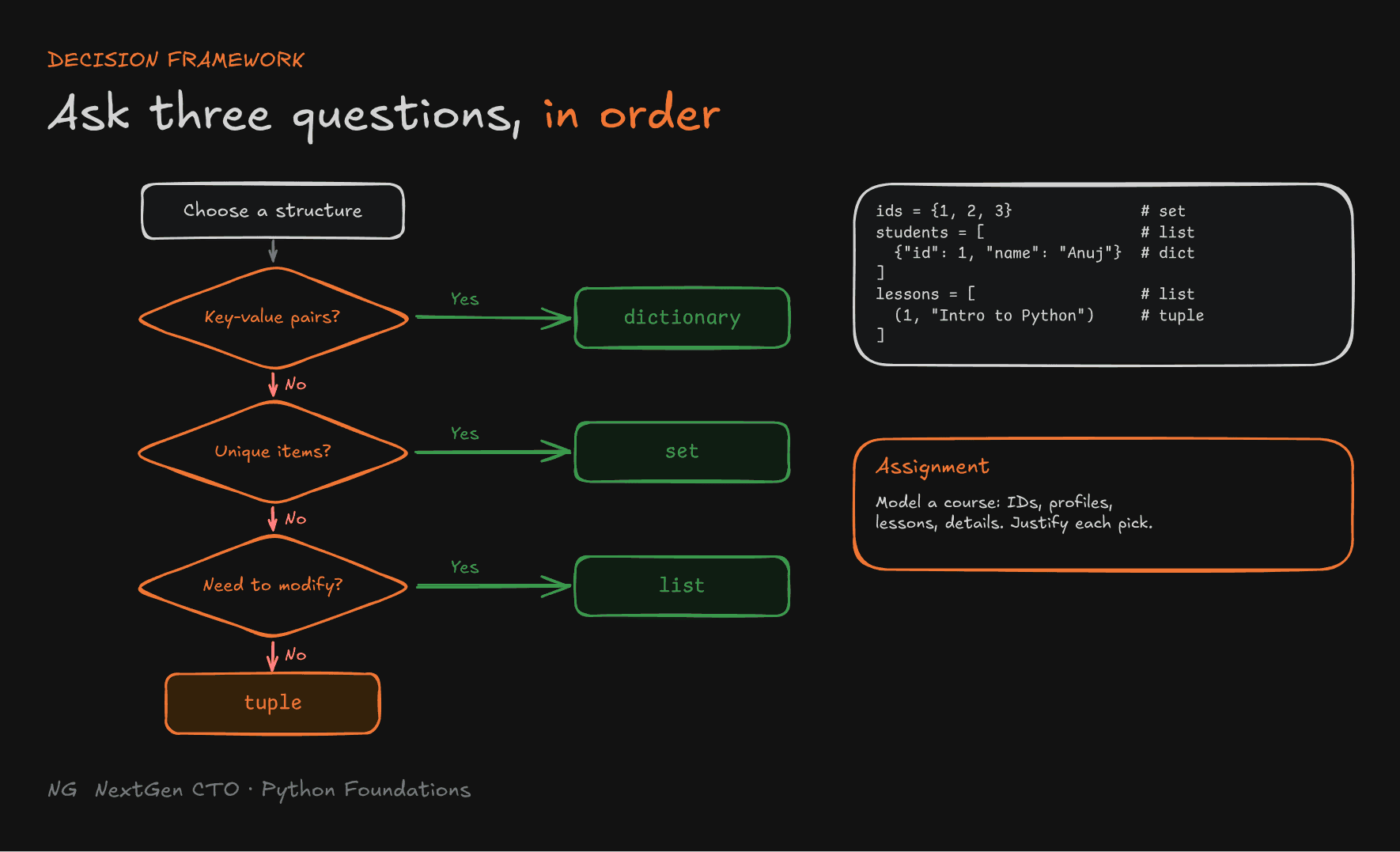
Ask these questions in order:
- Do I need key-value pairs? Yes → dictionary.
- Do I need unique items? Yes → set.
- Do I need to modify the items? Yes → list. No → tuple.
It isn't set in stone, but it's the right default while you're learning.

Assignment: Course Management System
Model a small Python course with the right structures:
enrolled_student_ids = {1, 2, 3, 4, 5}         # IDs are unique → set

students = [                                    # many profiles → list
    {"id": 1, "name": "Anuj", "age": 20},       # each profile has named fields → dict
    {"id": 2, "name": "Ankit", "age": 24},
]

course_lessons = [                              # lessons in order → list
    (1, "Introduction to Python"),              # each lesson is a fixed record → tuple
    (2, "Variables and Types"),
]

course_details = {                              # named fields → dict
    "name": "Python for Everyone",
    "year": 2026,
    "author": "CTO Bhaiya",
}
Try changing things. Should a lesson title be editable? If yes, a tuple was the wrong choice. Thinking through these trade-offs is the actual exercise.
Part 6.1 — Functions
What Is a Function?
Say making tea takes 10 steps, and you need 5 cups at different points in your program. Copying the 10 lines 5 times means 50 lines. And if you later change "1 spoon of sugar" to 2, you'd have to fix it in 5 places.
A function is a reusable, named block of code. Write the 10 steps once, name it make_tea(), and call it 5 times: about 15 lines, with one place to change the sugar.
Functions make code:
- non-repetitive: no copy-pasting the same logic
- clean and modular: each piece has a name and a job
- easy to maintain and test: change or test one place
Defining and Calling a Function
def make_tea():
    """Make a cup of tea."""        # optional docstring
    print("Take a utensil")
    print("Pour 2 cups of water")
    print("Add 2 spoons of sugar")
    print("Add 2 spoons of tea")

make_tea() # the call: only now does the body run- Use the
defkeyword, then the name, parentheses and a colon. - The body must be indented.
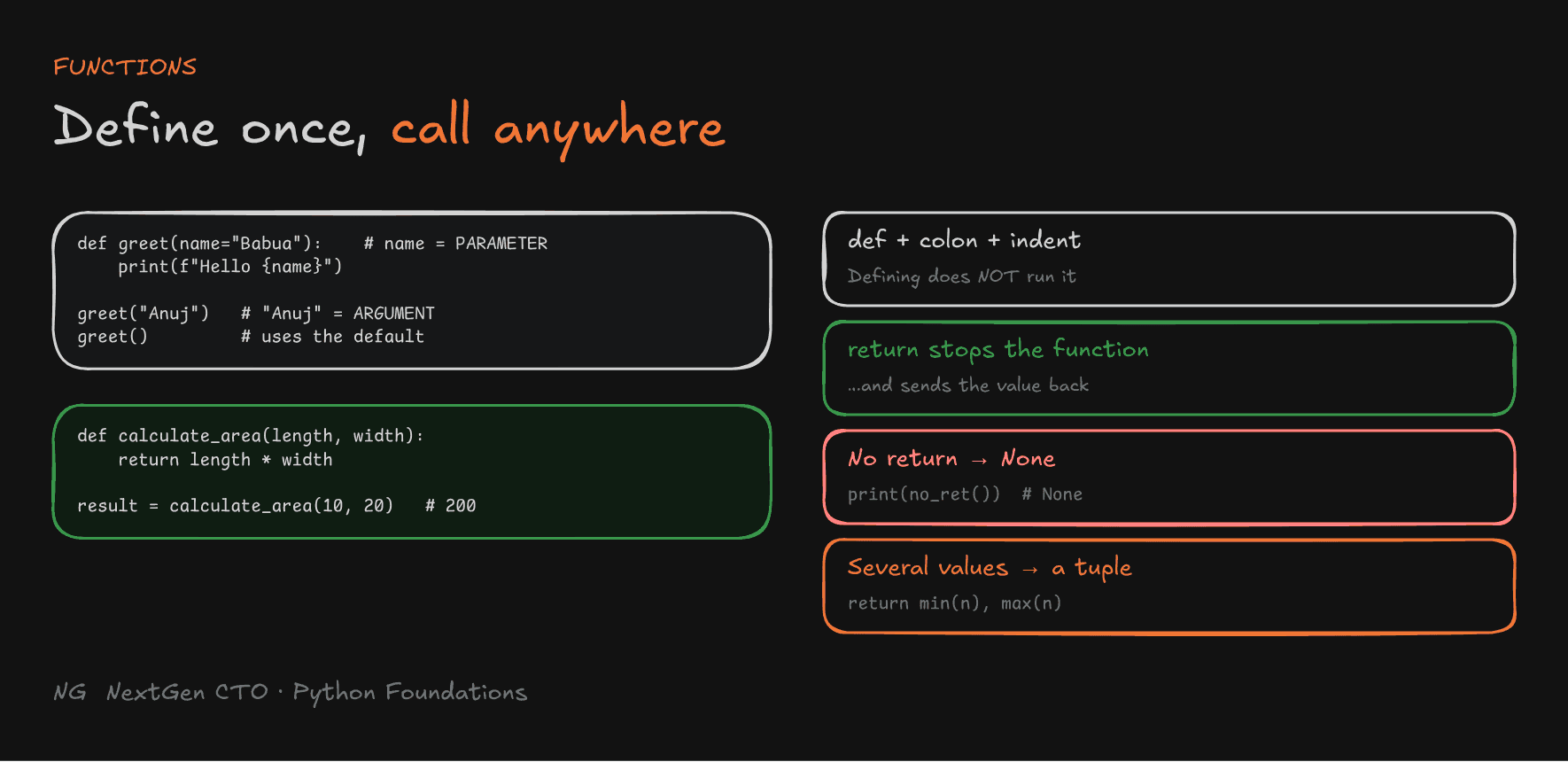
- Defining a function doesn't run it. The code runs only when it's called.
Parameters vs Arguments
- Parameters are the variable names in the definition.
- Arguments are the actual values passed in the call.
def greet(name):          # name is a PARAMETER
    print(f"Hello {name}")

greet("Anuj")             # "Anuj" is an ARGUMENT → Hello Anuj
By default, arguments match parameters by position: the first argument goes to the first parameter, the second to the second. These are positional arguments.
Default parameters are used when no argument is passed:
def greet(name="Babua"):
    print(f"Hello {name}")

greet("Anuj")    # Hello Anuj
greet()          # Hello Babua
Returning Values
return sends a result back to the caller:
def calculate_area(length, width):
    area = length * width
    return area

result = calculate_area(10, 20)
print(result) # 200returnimmediately stops the function. Lines after it don't run.- A function without a
returnreturnsNone. - You can return multiple values. Python packs them into a tuple:
def min_max(nums):
    return min(nums), max(nums)

low, high = min_max([3, 9, 1])   # unpack → 1, 9
Local and Global Scope
Scope decides where a variable can be accessed.
- Local variables are created inside a function. They exist only while it runs, and can't be accessed outside it.
- Global variables are created at the top level of the file (the module). Functions can read them.
def calculate():
    percent = 90

calculate()
print(percent)    # NameError: name 'percent' is not defined
Assigning inside a function creates a new local variable, even if a global has the same name:
result = 20

def update():
    result = 100     # a NEW local variable, not the global one

update()
print(result)        # 20: the global is unchanged
To actually reassign a global inside a function, you must declare it with global result. Use this sparingly, because hidden global changes make code hard to follow.
Note:
if,forandwhiledon't create a new scope in Python. A variable created inside anifat the top level is still global. Only functions create a local scope.
Recursion
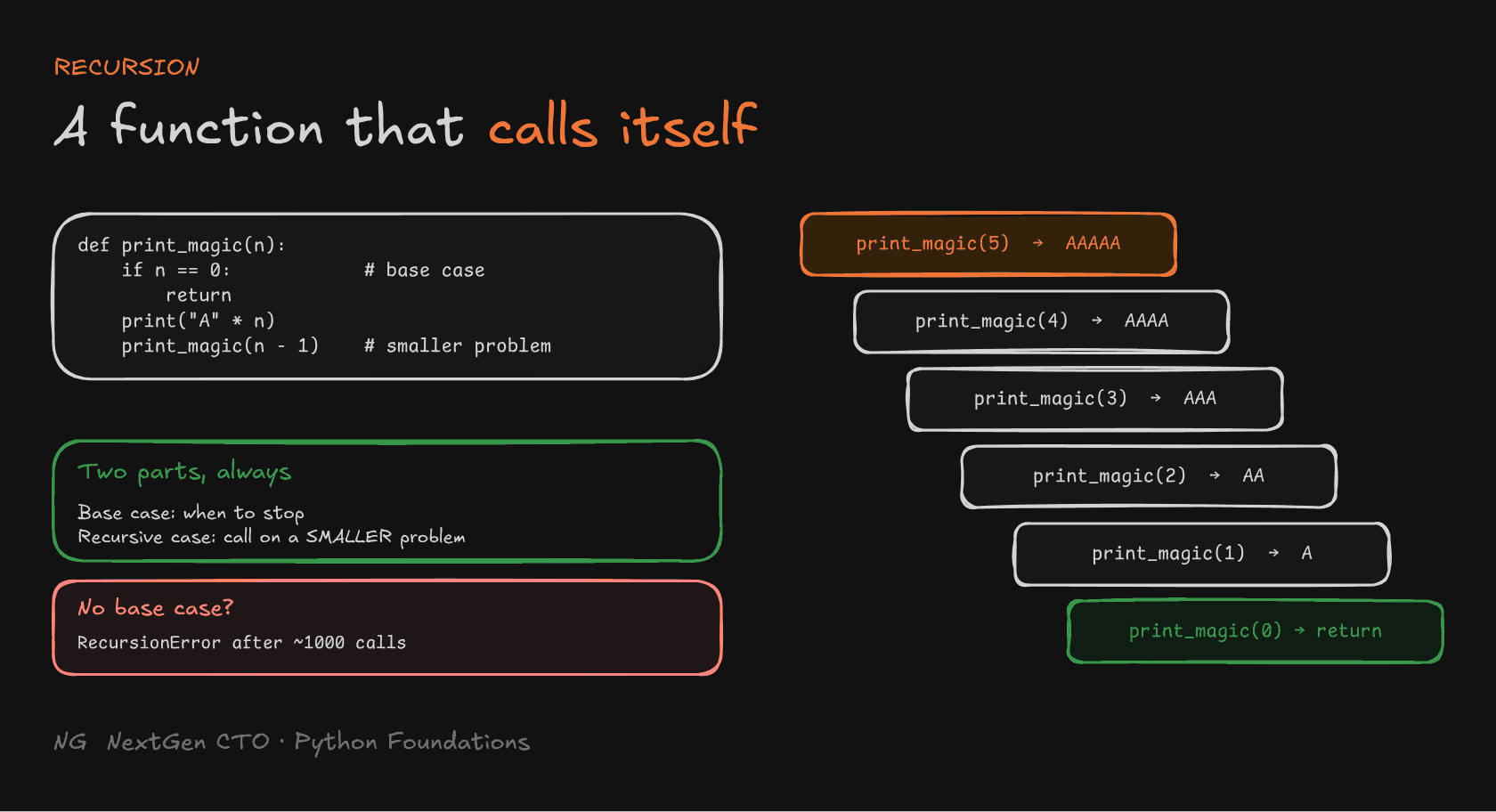
Recursion is when a function calls itself. It solves a problem by breaking it into smaller versions of the same problem.
Every recursive function needs two parts:
- a base case, where it stops calling itself
- a recursive case, where it calls itself with a smaller problem
def print_magic(n):
    if n == 0:          # base case: stop
        return
    print("A" * n)
    print_magic(n - 1)  # recursive case: smaller problem

print_magic(5)
# AAAAA
# AAAA
# AAA
# AA
# A
Forget the base case and the calls never end. Python stops it at about 1,000 nested calls with RecursionError: maximum recursion depth exceeded.

Naming Functions (PEP 8)4
- Use snake_case: lowercase words joined by underscores.
- Start with an action word:
calculate_total,get_user_name,send_email. - Avoid cryptic abbreviations:
calculate_totalbeatsct. - Follow DRY (Don't Repeat Yourself): if you write the same logic twice, make it a function.
Part 6.1.1 — How Functions Live in Memory
What Happens When You Define a Function
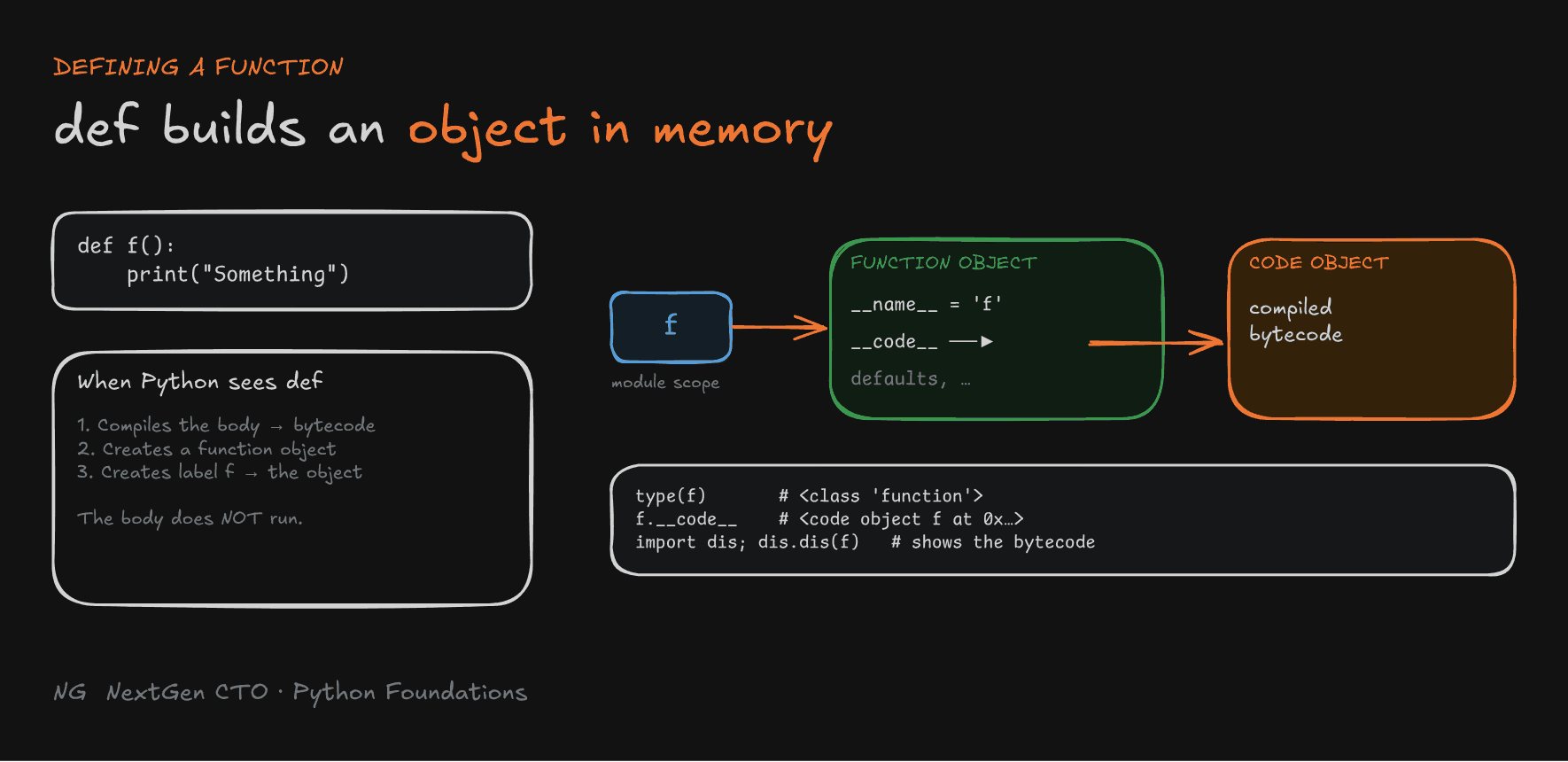
def f():
    print("Something")
When Python reaches this def, it doesn't run the body. It does three things:
- Compiles the function body into bytecode, stored in a code object.
- Creates a function object in memory, whose
__code__attribute points to that code object. - Creates a label
fin the module scope, pointing to the function object.
It's the same idea as x = 10: a label pointing to an object. Here the object is a function. It also holds other details, like default argument values, which you'll use later.
You can inspect all of this:
print(type(f))        # <class 'function'>
print(f.__name__)     # f
print(f.__code__)     # <code object f at 0x...>

import dis
dis.dis(f)            # shows the bytecode instructions
What Happens When You Call a Function: The Call Stack
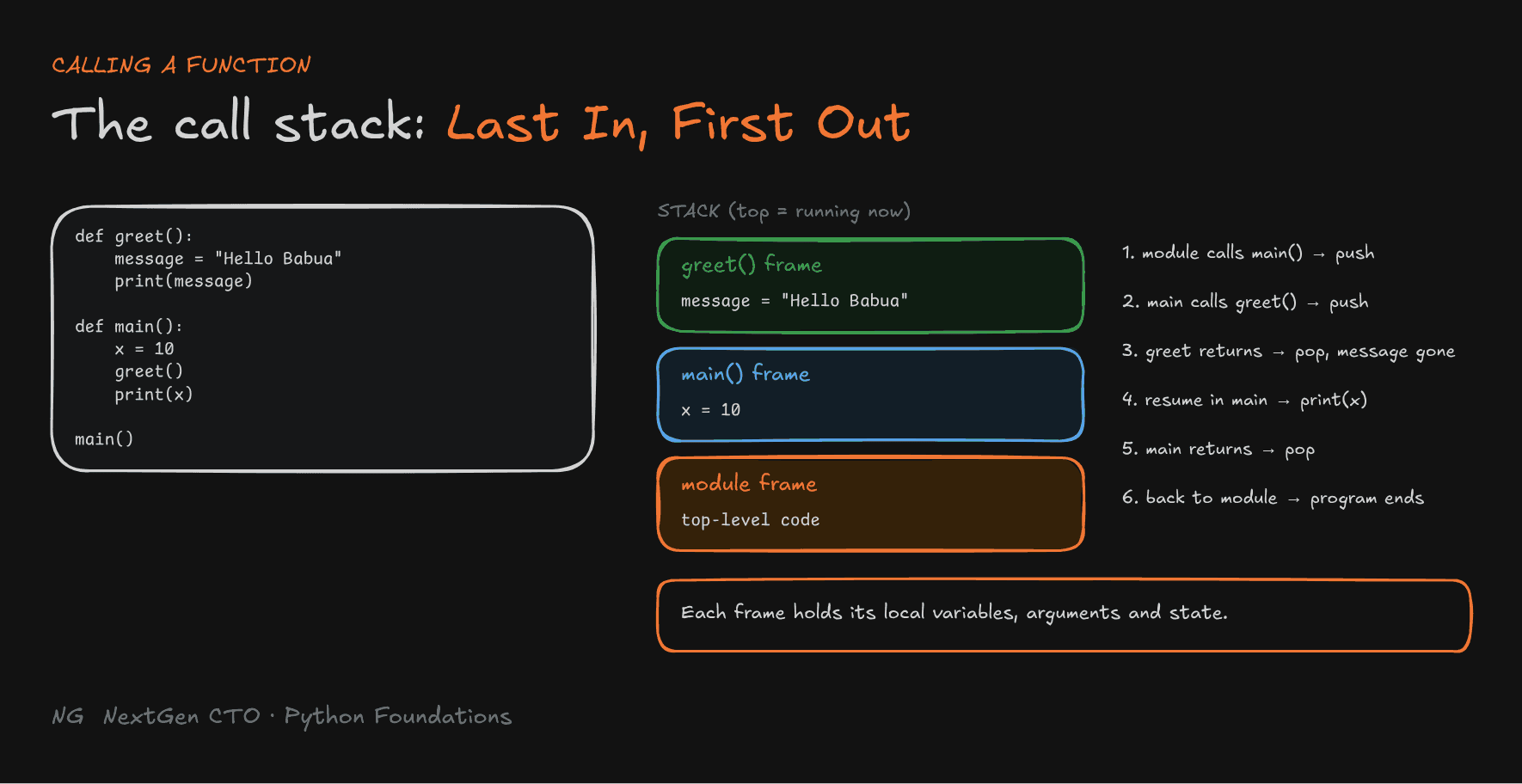
Python manages running functions with a call stack. Each call gets a stack frame, which stores that call's local variables, arguments and execution state.
def greet():
    message = "Hello Babua"
    print(message)

def main():
    x = 10
    greet()
    print(x)

main()- The module frame runs the top-level code and calls
main(). - A
main()frame is pushed on top. It createsx = 10, then callsgreet(). - A
greet()frame is pushed on top. It createsmessageand prints it. greet()finishes, so its frame is removed (along withmessage). Execution resumes inmain(), right after the call, and printsx.main()finishes, so its frame is removed, and control returns to the module. The program ends.
The function on top of the stack is the one currently running. The last frame pushed is the first one removed: Last In, First Out (LIFO).

Why this matters: once you can picture labels, objects and stack frames, questions like "where did this variable go?" or "why did this value survive?" answer themselves, in Python and in every other language you learn after it.
Key Takeaways
- Choose collections by the four pillars: mutability, order, uniqueness and lookup speed.
- Decision framework: key-value → dict, unique → set, needs changes → list, fixed → tuple.
- Sets and dicts give fast membership checks through hashing. Lists and tuples scan item by item.
- A function is a named, reusable block.
defdefines it, and calling it runs it. - Parameters live in the definition, arguments in the call. Defaults fill in missing arguments.
returnstops the function and sends a value back. NoreturnmeansNone, and several values come back as a tuple.- Variables assigned inside a function are local. Only functions create a new scope.
- Recursion needs a base case and a smaller recursive case.
defcreates a function object (with bytecode in__code__) and a label pointing to it. Each call gets a stack frame on the LIFO call stack.
The main principle: a function is just another object behind a label. Picture the frames, and you understand the code.
Up next → Part 6.2: Variable Scope, Lifetime and Closures