
Python Fundamentals Series · Part 4 of 12
Python #3: Strings & Operators Explained in Depth | From Fundamentals to Advanced Concepts
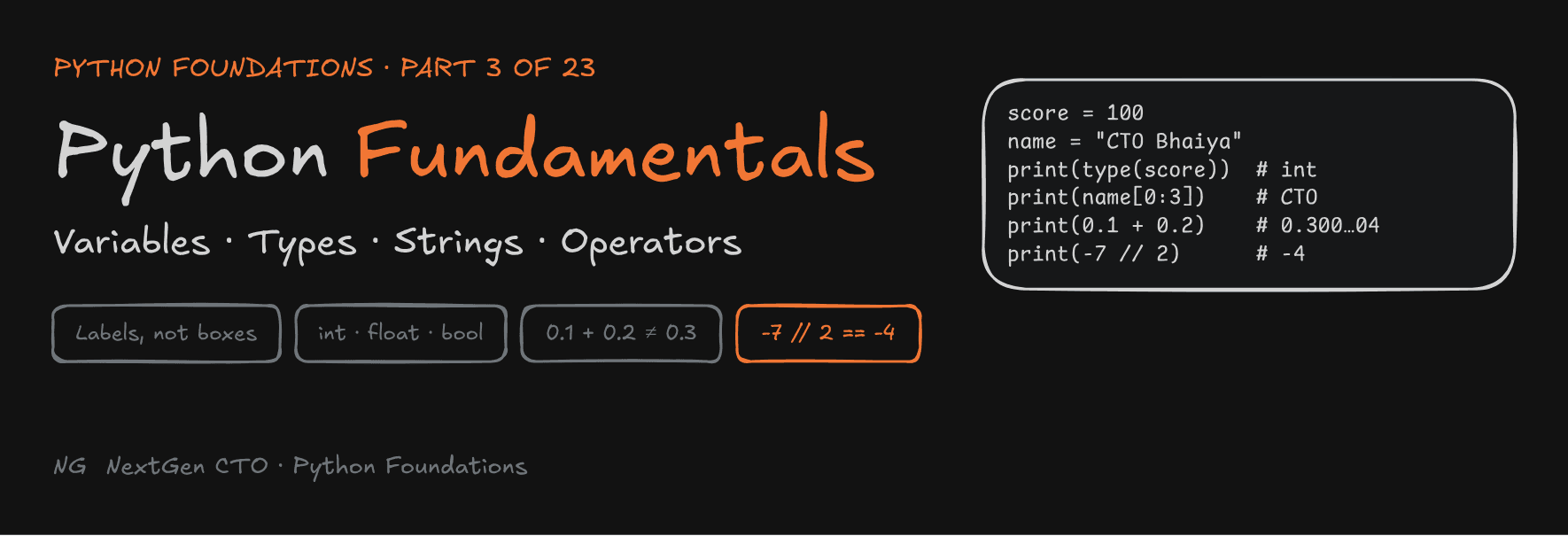
Python Foundations · Part 3 of 23
Python Fundamentals: Variables, Types, Strings and Operators
Variables aren't boxes, floats aren't exact, strings can never change, and -7 // 2 is -4. This is the part that changes how you think about every line of Python you write.
 Part 2 got your first program running. Now we go one level deeper. You'll see what actually happens in memory when you write
score = 100, which number types Python gives you, how to work with text, and the operator rules that trip up even experienced programmers.
Before you start: install VS Code and Python 3 (3.11 or newer). In VS Code, press **Ctrl + ** to open the terminal and run python3 --version`. If you see a version number, you're ready.
Part 3.1 — Variables
What Is a Variable?
A variable is a name you use to access data.
Without variables, you'd have to repeat values everywhere: print 100, add 100 to a total, compare 100… With a variable, you give the value a name once and use the name:
maths = 100
print(maths)
Variables Are Labels, Not Boxes
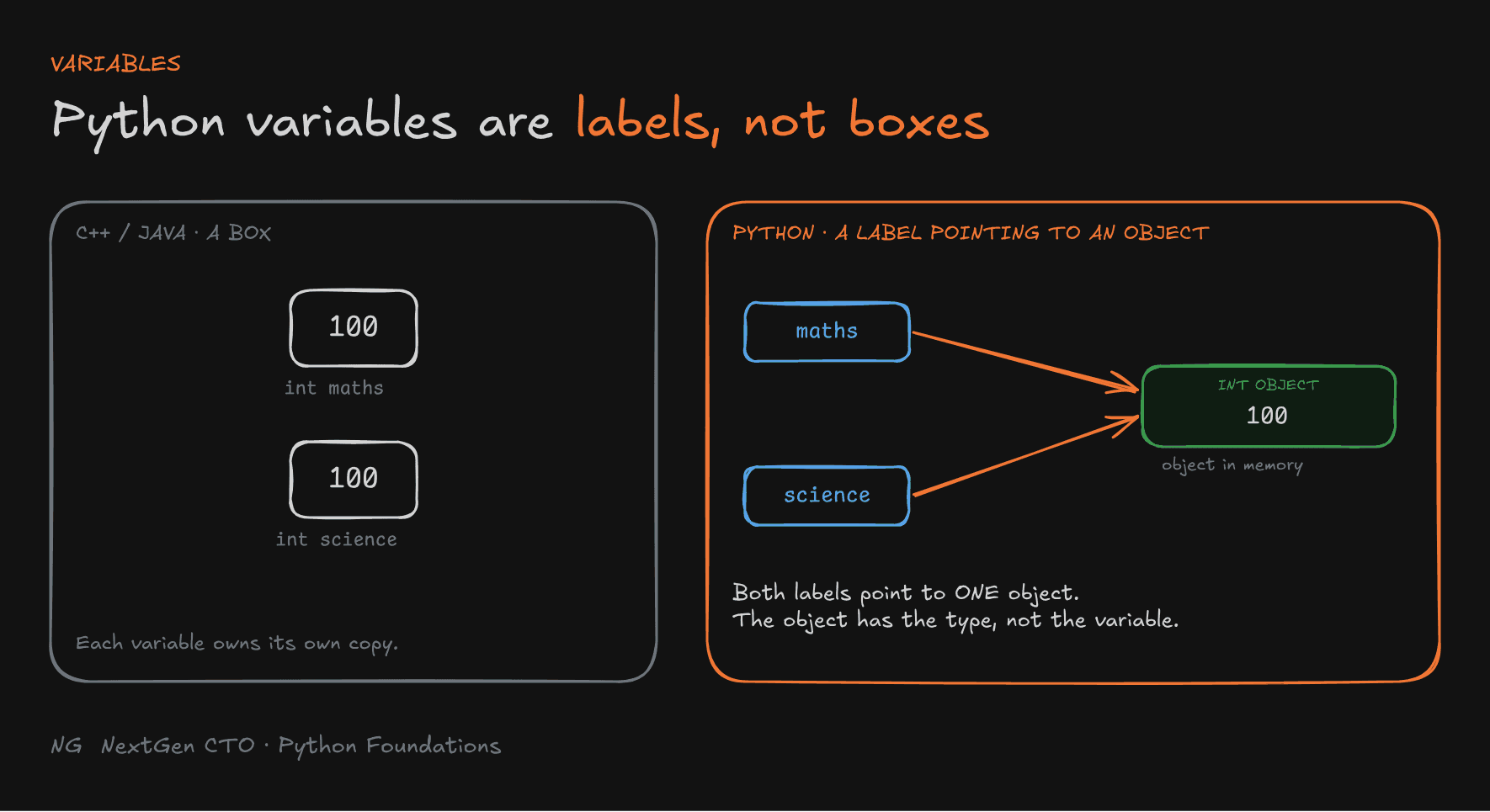
If you've seen C++ or Java, you may picture a variable as a box with a value stored inside it.
Python works differently. A variable is a label that points to an object in memory.
When you write score = 100:
- Python creates an object in memory. It's an
intobject holding the value100. - The name
scorebecomes a label that refers to that object.
The important part: the object has the type, not the variable. score is just a name. The thing it points to is an int.
Several labels can point to the same object:
maths_marks = 90
science_marks = maths_marks
This doesn't copy anything. Both names now point to the same int object with value 90.

Remember this model. Everything you create in Python later (functions, lists, classes) follows the same rule: a name points to an object.
Creating Variables
Use = to assign a value. The variable name goes on the left, and a value or expression goes on the right.
score = 100
name = "Anuj"

print(score)   # 100
print(name)    # Anuj
An expression is any piece of code that produces a value. 2 * 3 is an expression, because it produces 6.
Unlike Java or C++, you never declare a type. Python works out the type while the program runs, from the object you assigned.
Variables as References: id(), is and ==
Python gives you tools to see this "label → object" model for yourself.
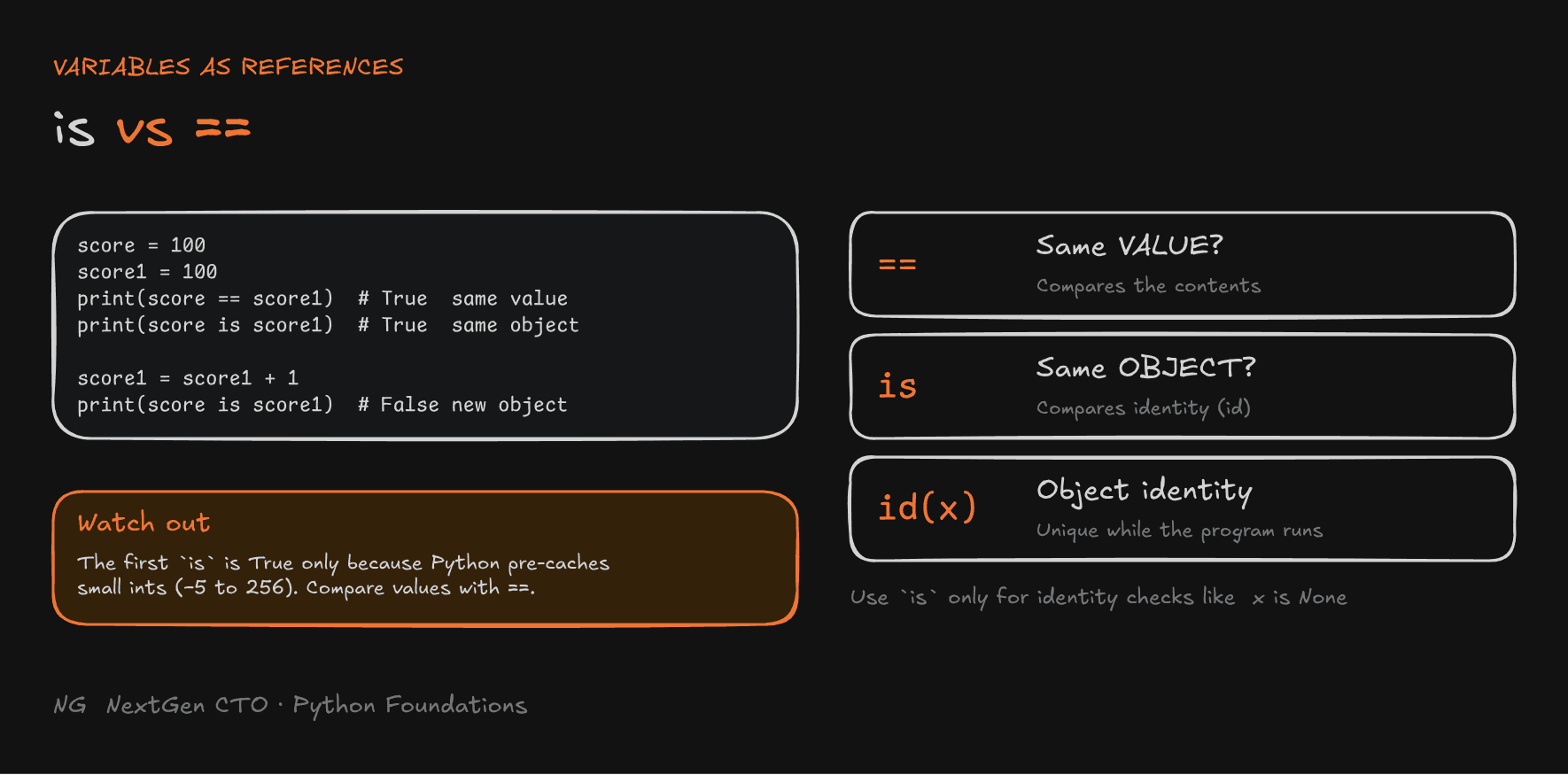
id(x)returns the object's unique identity while the program runs. Think of it as its memory address, though it isn't guaranteed to be one.x is ychecks whether two labels point to the same object (sameid).x == ychecks whether two objects have the same value.
score = 100
score1 = 100
print(score == score1)   # True: same value
print(score is score1)   # True: same object

score1 = score1 + 1
print(score, score1)     # 100 101
print(score is score1)   # False: score1 now points to a new object
When you did score1 + 1, Python didn't change the 100 object. It created a new int object with value 101 and moved the score1 label to it.
Watch out:
score is score1wasTrueabove because Python pre-creates small integers from -5 to 256 and reuses them. It does not search memory for an existing value in general. For other values, two equal numbers are often separate objects:a = int("1000") b = int("1000") print(a == b) # True print(a is b) # FalseRule of thumb: use
==to compare values. Useisonly when you really mean "the same object", for examplex is None.

Automatic Type Detection
Python finds a variable's type from the object it points to. Use type() to see it:
new_score = 100
price = 90.5
product_name = "iPhone"

print(type(new_score))     # <class 'int'>
print(type(price))         # <class 'float'>
print(type(product_name))  # <class 'str'>
This makes Python a dynamically typed language: types are checked while the program runs, and variables don't have fixed, declared types.
Reassignment and Dynamic Binding
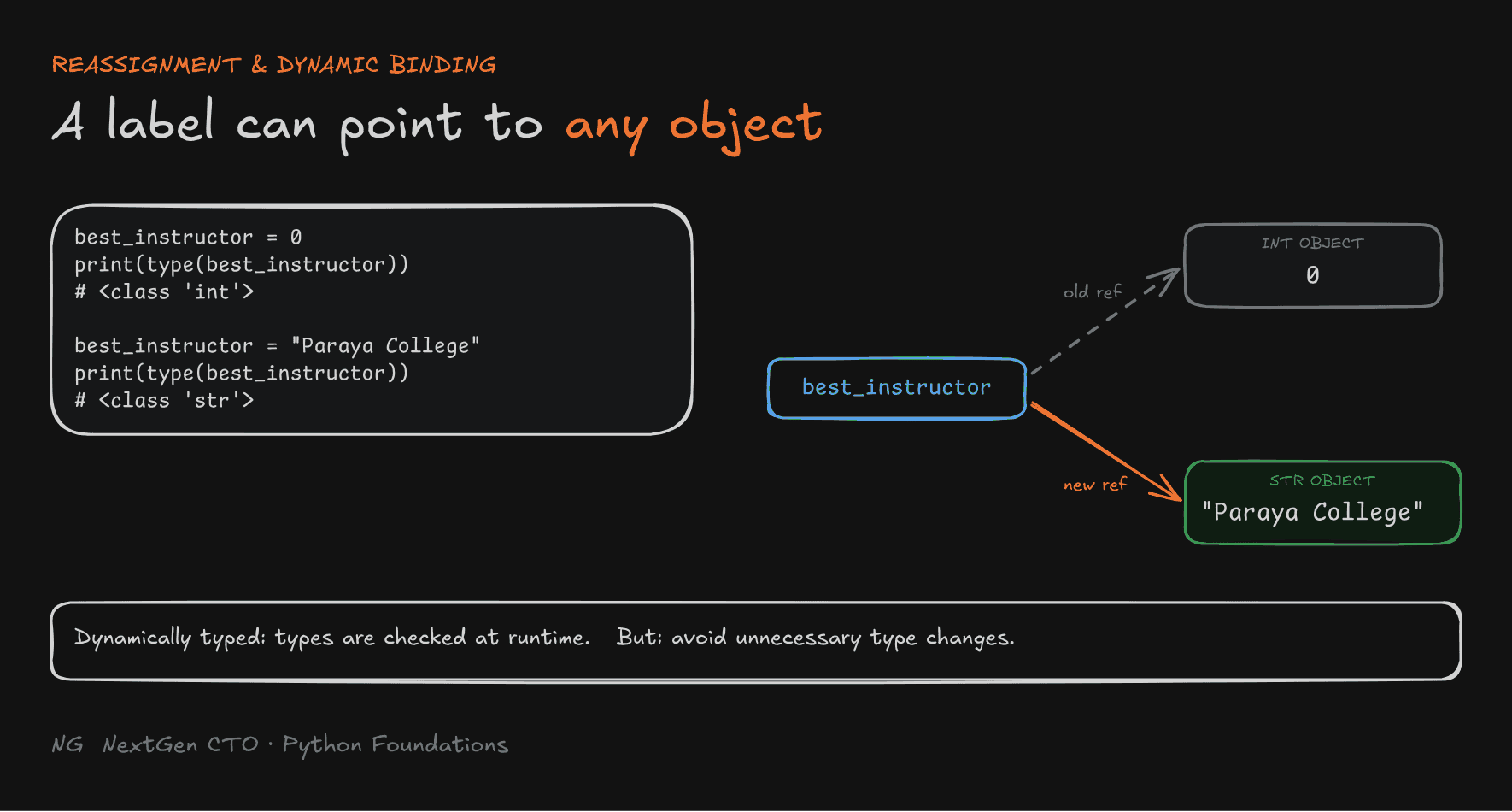
Because a variable is just a label, you can point it at a new object, even one of a different type:
best_instructor = 0
print(type(best_instructor))   # <class 'int'>

best_instructor = "Paraya College"
print(type(best_instructor))   # <class 'str'>
The label moved from the int object to a new str object. Nothing was converted.
Just because you can doesn't mean you should. A variable that changes type halfway through a program is hard to read and debug. Avoid unnecessary type changes.

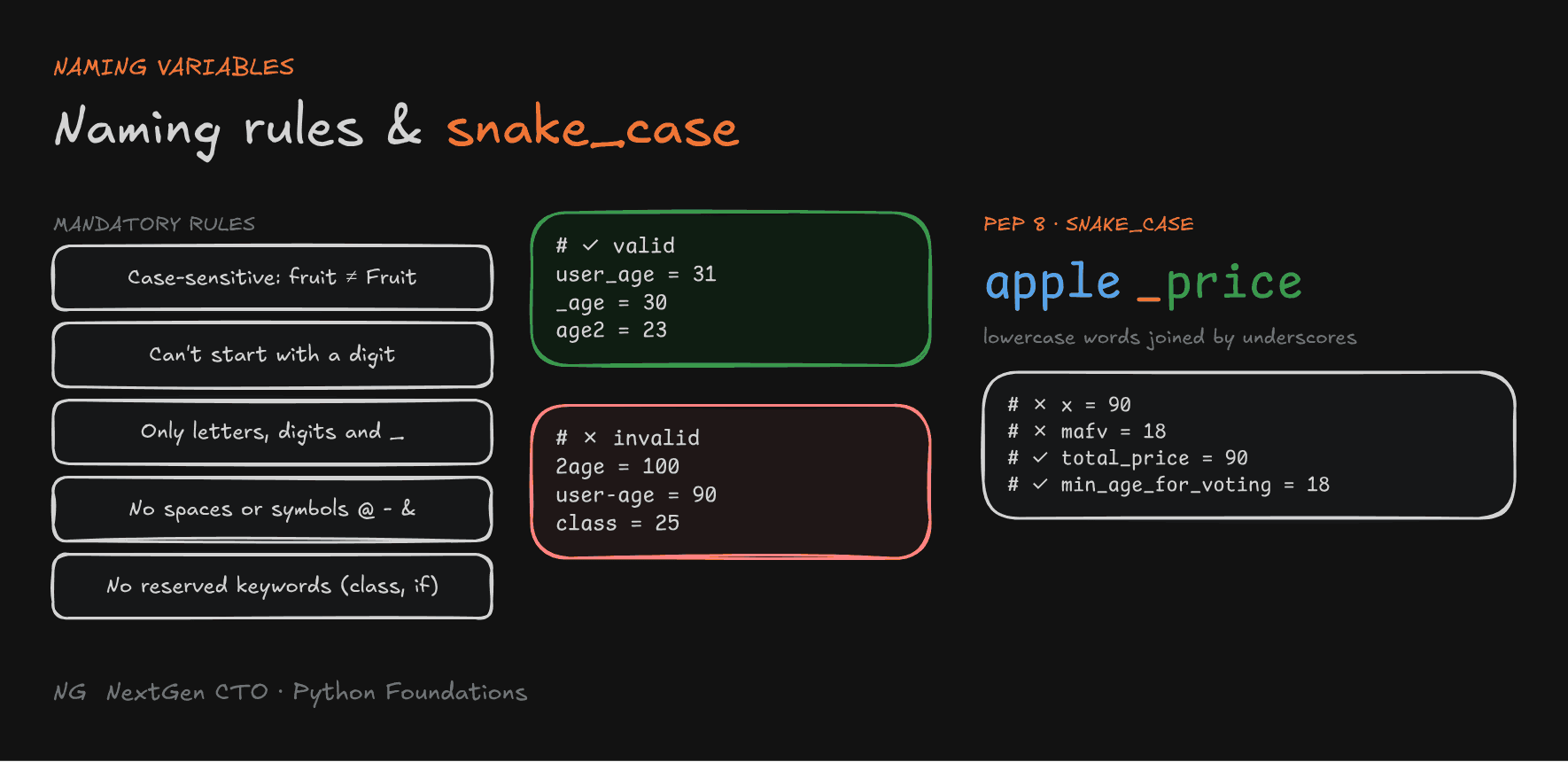
Variable Naming Rules
These rules are mandatory. Break them and Python raises an error.
- Names are case-sensitive:
fruitandFruitare different variables. - A name can't start with a digit.
- Use only letters, digits and underscores (
_). - No spaces or special symbols like
@,-or&. - Reserved keywords like
class,if,forandTruecan't be used.
# Valid
user_age = 31
_age = 30
age2 = 23

# Invalid
2age = 100        # SyntaxError: invalid decimal literal
user-age = 90     # SyntaxError: Python reads this as user minus age
class = 25        # SyntaxError: class is a reserved keyword
Keyword vs built-in:
print = 10actually runs without an error.10. Everyprint()after that line breaks. Never reuse built-in names liketype,listorstras variable names.
Naming Convention: PEP 8 and snake_case
PEP stands for Python Enhancement Proposal: a document where the community proposes new features and gathers feedback. PEP 8 is the official style guide for Python code.
For variables, PEP 8 says:
- Use snake_case: all lowercase, with words joined by underscores, like
apple_priceortotal_price. - Use meaningful, descriptive names.
- Avoid unnecessary abbreviations.
- Use short names only when their meaning is obvious.
# Not good
x = 90
mafv = 18

# Good
total_price = 90
min_age_for_voting = 18
A clear name saves you a comment.

Part 3.2 — Numbers and Booleans
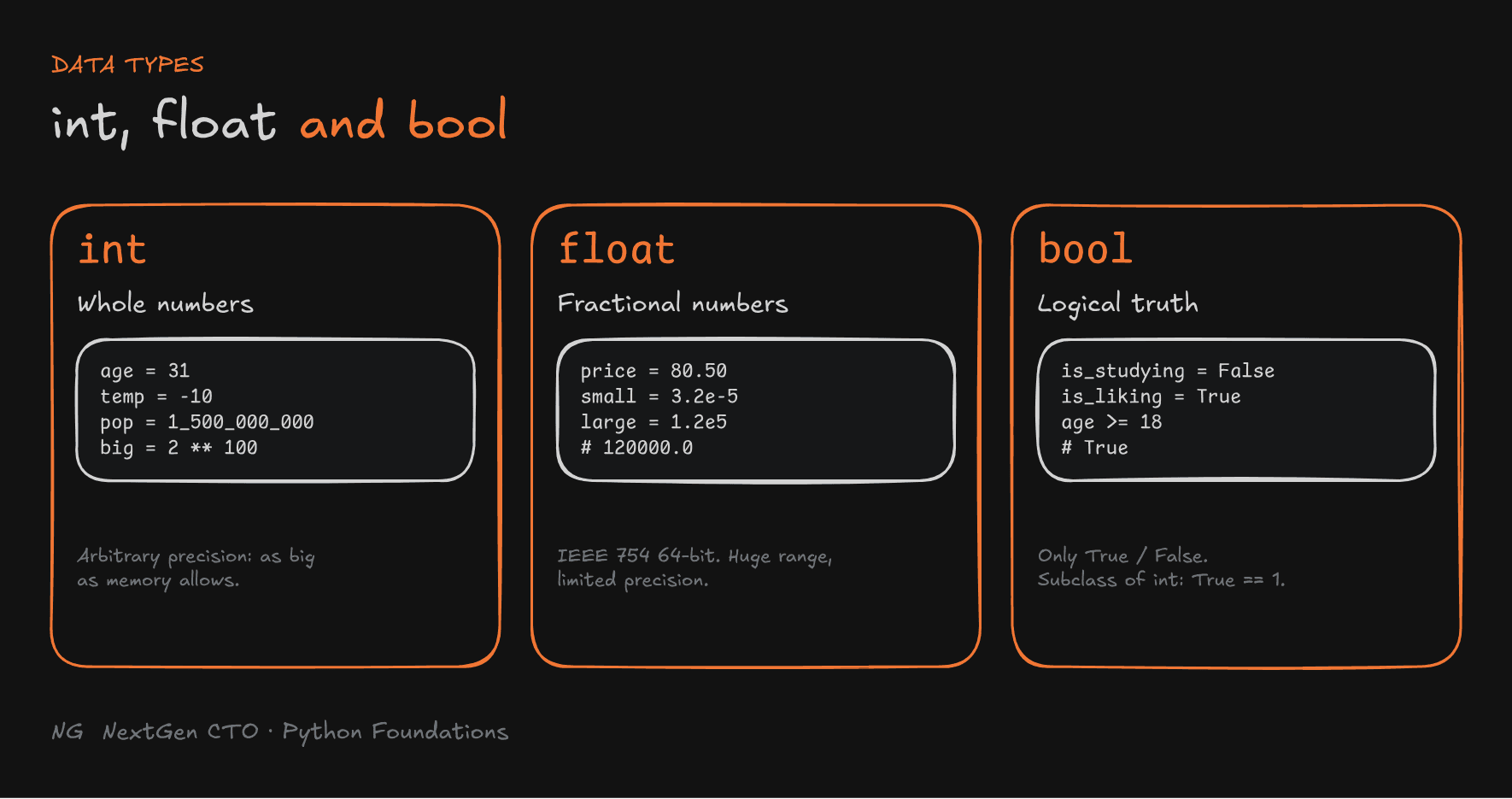
Every value in Python has a data type that tells Python what kind of value the object holds. This part covers three of them: int, float and bool.

Integers (int)
Integers are whole numbers: positive, negative and zero.
age = 31
temperature = -10
population = 1_500_000_000
large_number = 2 ** 100

print(population)     # 1500000000
print(large_number)   # 1267650600228229401496703205376
Two things are special about Python integers:
- Arbitrary precision. In Java or C++, an integer has a fixed size, such as 32 or 64 bits, and overflows past its limit. A Python
intcan grow as large as your available memory allows.2 ** 100just works. - Underscores for readability.
1_500_000_000is the same as1500000000. Underscores don't change the value. They only make big numbers easier to read.
Floating-Point Numbers (float)
Floats are numbers with a fractional part. 10 is an int, but 10.0 is a float.
price = 80.50
marks = 89.5
small = 3.2e-5   # 3.2 × 10⁻⁵
large = 1.2e5    # 1.2 × 10⁵ = 120000.0

print(type(large)) # <class 'float'>emeans scientific notation:6.2e23is 6.2 × 10²³.- Floats can represent very large and very small numbers, but their precision is limited.
- Floats also have a maximum value.
sys.float_info.maxis about1.797e+308.
The Floating-Point Precision Problem
This surprises almost every beginner:
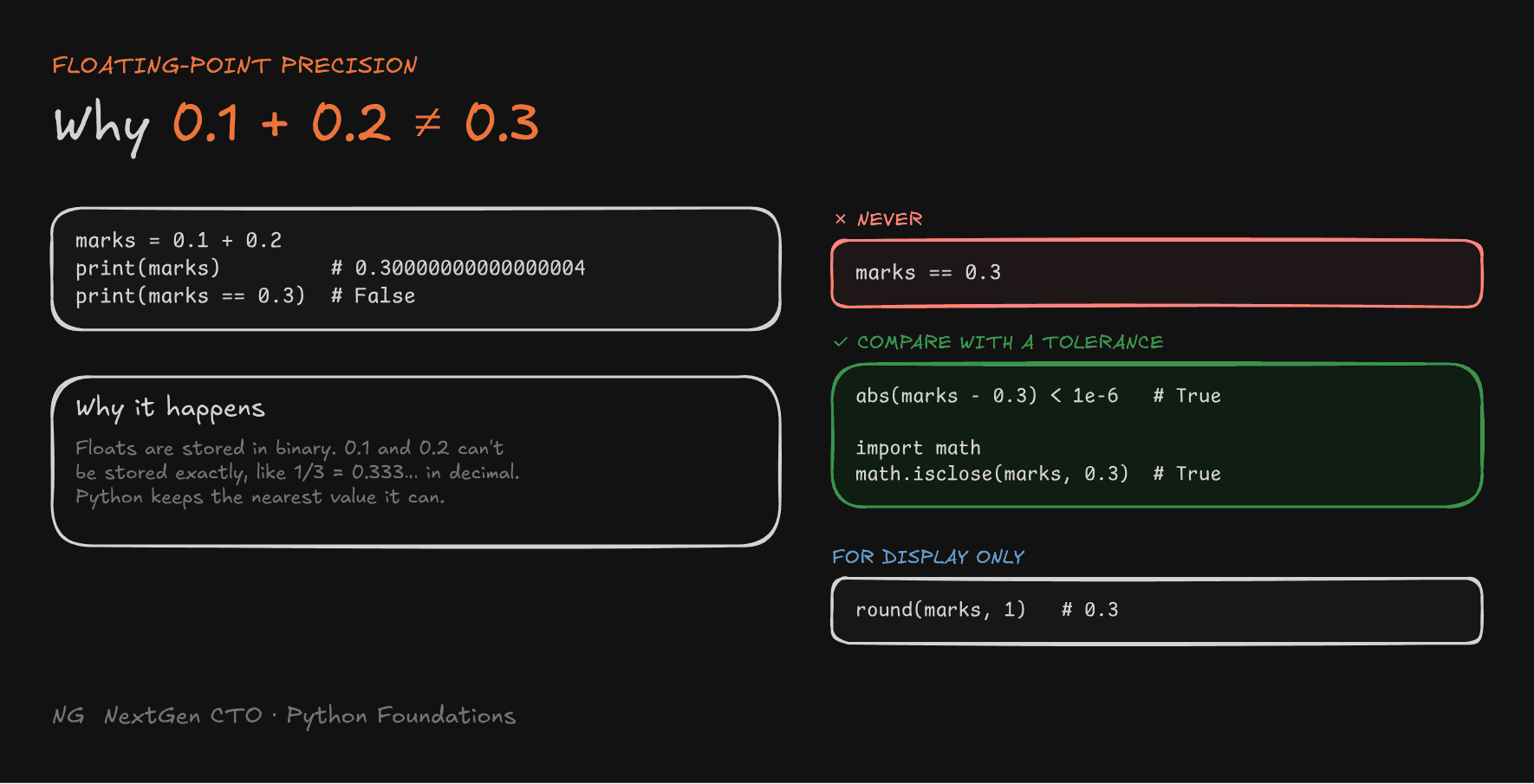
marks = 0.1 + 0.2
print(marks)          # 0.30000000000000004
print(marks == 0.3)   # False
Why? Computers store floats in binary. Some decimal fractions, like 0.1 and 0.2, can't be stored exactly in binary, the same way 1/3 can't be written exactly in decimal (0.3333…). Python stores the nearest float it can represent, and those tiny errors add up.
So never compare floats directly with ==.
Handling Precision with round()
round(number, digits) rounds a number to a given number of decimal places. It's useful for displaying results:
marks = 0.1 + 0.2
print(round(marks, 1))   # 0.3
print(round(2.78, 1))    # 2.8
Note:
round()changes what you see, not how floats work. The result is still the nearest binary float to 0.3, which in full is0.29999999999999999. Rounding doesn't make float storage exact.
Comparing Floats the Right Way
Check whether two floats are close enough instead of exactly equal:
import math

marks = 0.1 + 0.2

# Option 1: is the difference tiny?
print(abs(marks - 0.3) < 1e-6)     # True

# Option 2: the built-in helper
print(math.isclose(marks, 0.3))    # True
Booleans (bool)
A boolean represents logical truth. There are only two values: True and False.
is_studying = False
is_liking = True
is_showing_support = True

print(type(is_studying)) # <class 'bool'>- They're case-sensitive:
TrueandFalsemust start with a capital letter.truegives an error. - Booleans usually come from comparisons, like
age >= 18, and drive decisions:
        age >= 18 ?
        /         \
     True         False
   Eligible    Not Eligible
boolis a subclass ofint.Truebehaves like1andFalselike0:
print(True == 1)       # True
print(True + True)     # 2
Deep Dive: How a Float Is Actually Stored (IEEE 754)
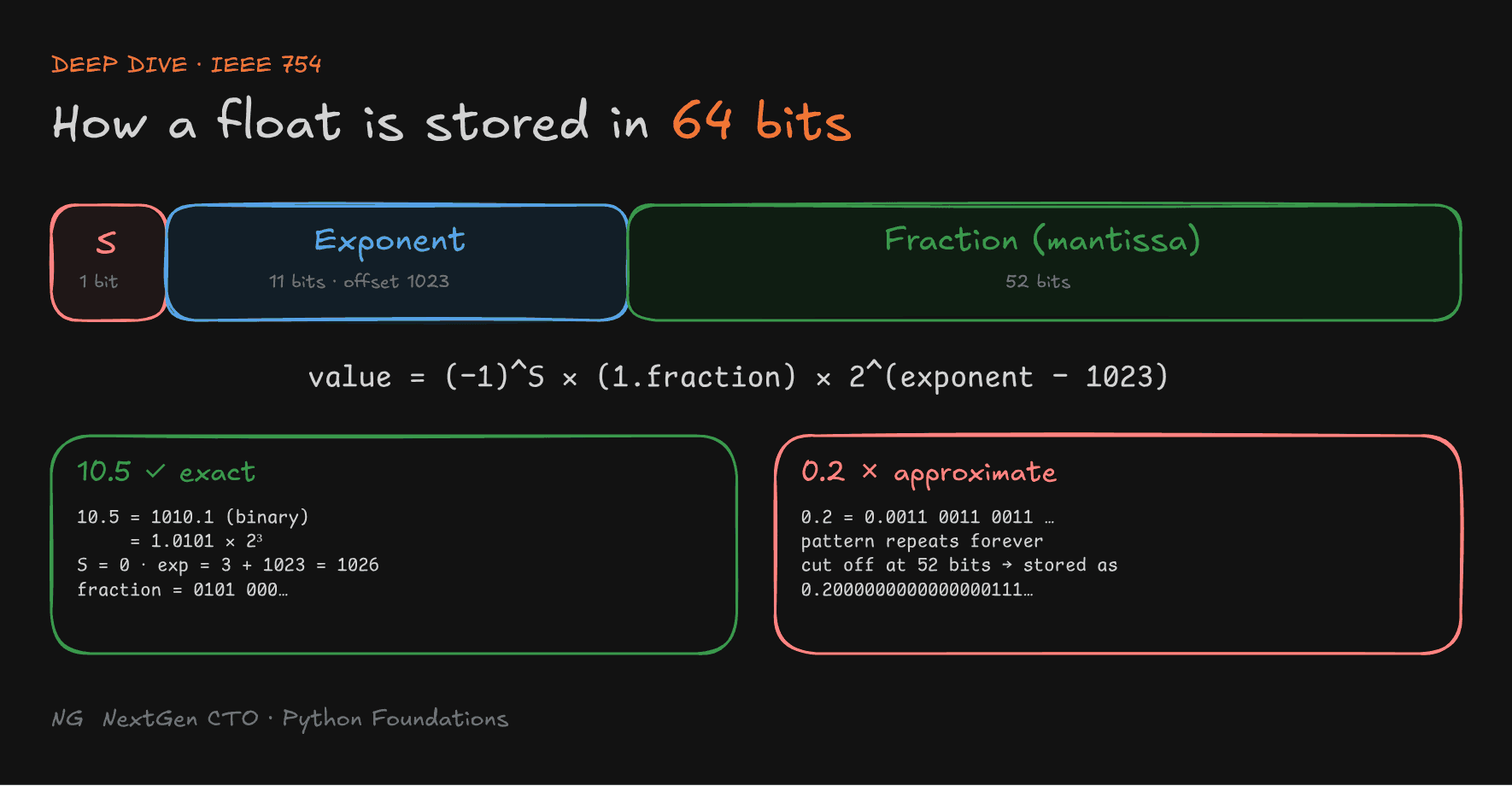
Python floats follow the IEEE 754 64-bit standard. It's the international standard for how computers store and calculate with decimal numbers. Each float takes 64 bits (8 bytes), split into three parts:
The value is: (−1)S × (1.fraction) × 2(exponent − 1023)
Example: 10.5, which can be stored exactly.
- 10 in binary is
1010, and 0.5 is.1(that's 2⁻¹). So 10.5 is1010.1. - Normalise it:
1.0101 × 2³ - Sign =
0, exponent = 3 + 1023 = 1026, fraction =0101followed by zeros.
Example: 0.2, which can't be stored exactly.
In binary, 0.2 is 0.0011 0011 0011 …, and the pattern repeats forever. With only 52 fraction bits, Python has to cut it off. So what's stored is actually 0.200000000000000011102230246…, very close to 0.2 but not equal to it.
 Homework:
- Convert 0.2 to binary by hand for at least 10 bits and watch the pattern repeat.
- Why does the exponent use an offset of 1023?
- How does IEEE 754 represent infinity? Try
float("inf")in Python.
Part 3.3 — Strings
Creating Strings
A string (str) stores text: usernames, passwords, messages, anything made of characters.
- Wrap text in single quotes (
'...') or double quotes ("..."). In Python, both work exactly the same way. - Choose quotes that don't conflict with the text inside:
name = "Anuj"
message = 'Please watch this series'
quote = "Please watch CTO Bhaiya's series"   # ' inside " " is fine
If you wrote 'Please watch CTO Bhaiya's series', Python would think the string ends at the apostrophe and raise a SyntaxError.
Like every value, name = "Anuj" creates a str object in memory, and name is a label pointing to it.
Python reuses identical strings:
message = 'Please watch this series'
quote = "Please watch this series"
print(quote is message)   # True: same object in memory
Python saw that this exact string already existed and pointed quote at it instead of making a copy. This is called string interning. It's only safe because strings can never change. More on that below.
String Concatenation
Concatenation means joining strings with the + operator.
first_name = "CTO"
last_name = "Bhaiya"
channel_name = first_name + " " + last_name
print(channel_name) # CTO Bhaiya+does not add a space for you. Add" "yourself.- The result is a brand-new string object.
first_nameandlast_nameare untouched. You can confirm it:id()gives three different values.

String Indexing and Length
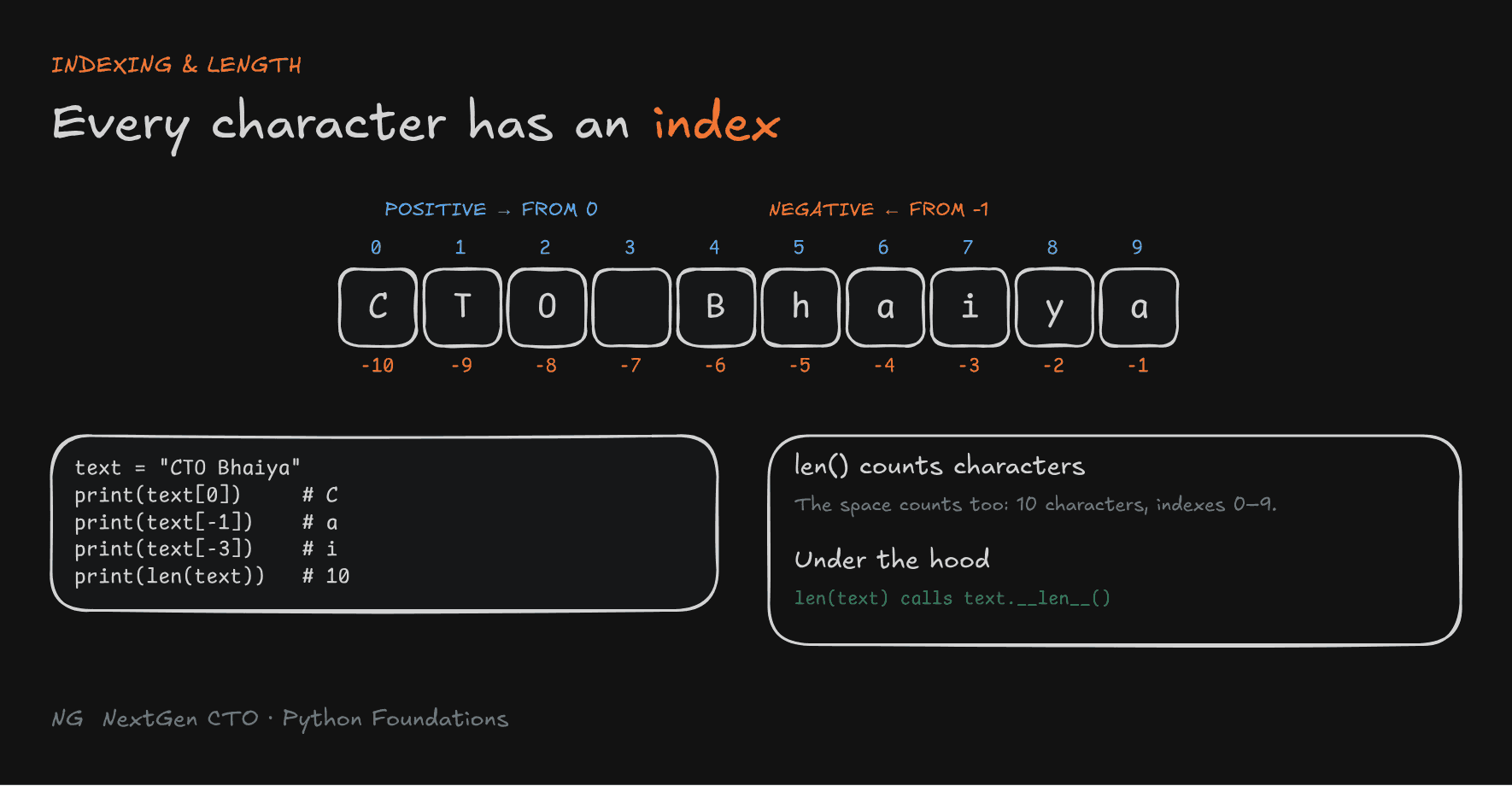
Every character has a position called an index, starting at 0. Python also supports negative indexes, which count from the end, starting at -1.
 Index:   0   1   2   3   4   5   6   7   8   9
          C   T   O       B   h   a   i   y   a
 Neg:   -10  -9  -8  -7  -6  -5  -4  -3  -2  -1
text = "CTO Bhaiya"
print(text[0])      # C
print(text[-1])     # a   (last character)
print(text[5])      # h
print(text[-3])     # i
print(len(text))    # 10
[ ]with an index gets one character.len()returns the number of characters. The space counts too.
Under the hood:
len(text)actually calls a method on the string object:text.__len__(). Python gives you the cleanerlen()syntax so you don't have to write the method name. You'll see more of these "dunder" (double underscore) methods later.

String Slicing
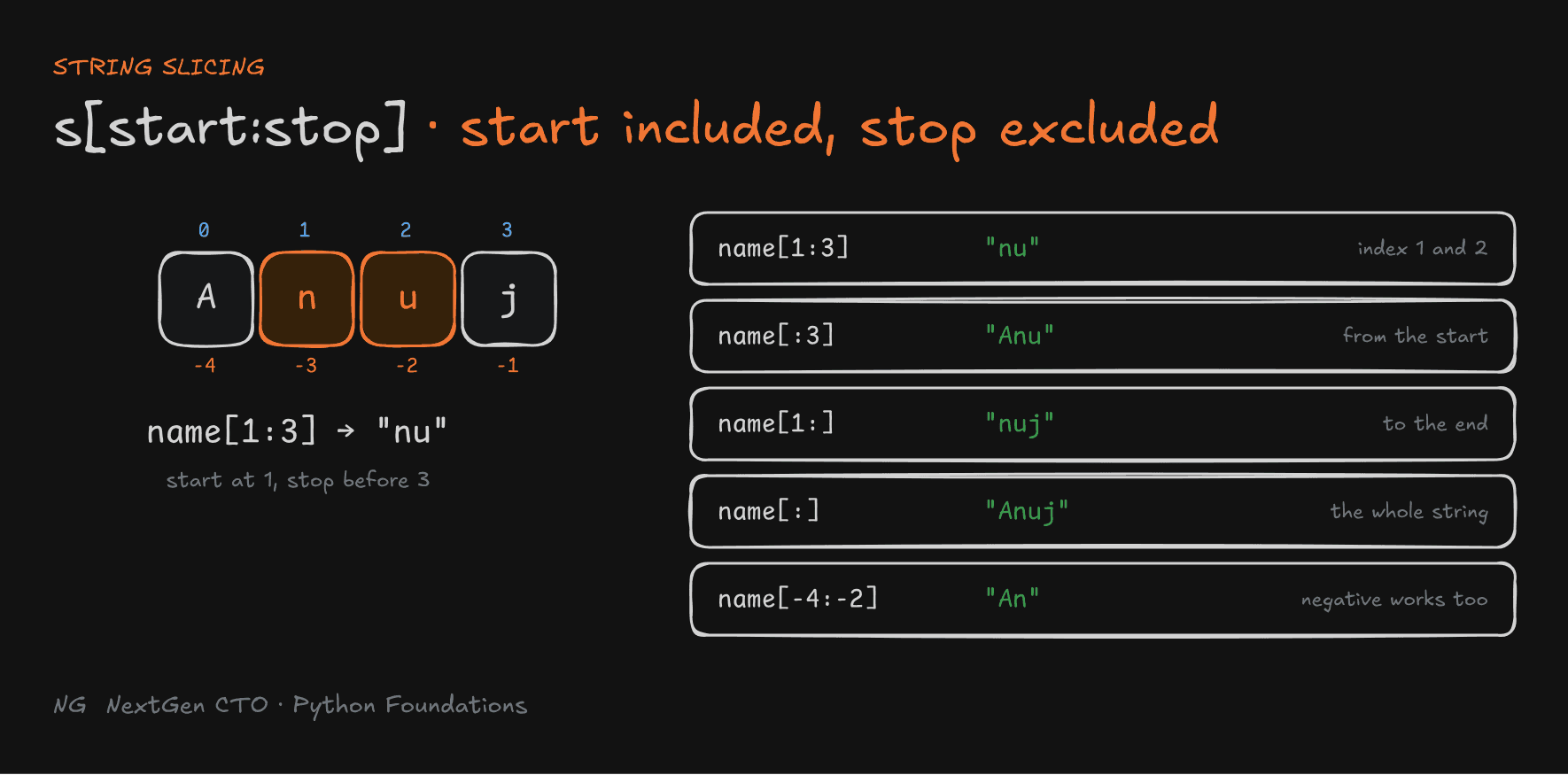
Slicing extracts part of a string:
string[start:stop]
startis included, andstopis excluded.- Leave out
startand the slice begins at the start of the string. Leave outstopand it runs to the end. [:]returns the full string.
name = "Anuj"     # A=0  n=1  u=2  j=3

print(name[1:3])    # nu    (index 1 and 2; 3 is excluded)
print(name[:3])     # Anu   (from the start up to index 2)
print(name[1:])     # nuj   (from index 1 to the end)
print(name[:])      # Anuj  (the whole string)
print(name[-4:-2])  # An    (negative indexes work too)
Tip: to remember "stop is excluded", read
name[1:3]as "start at 1, stop before 3".

String Immutability
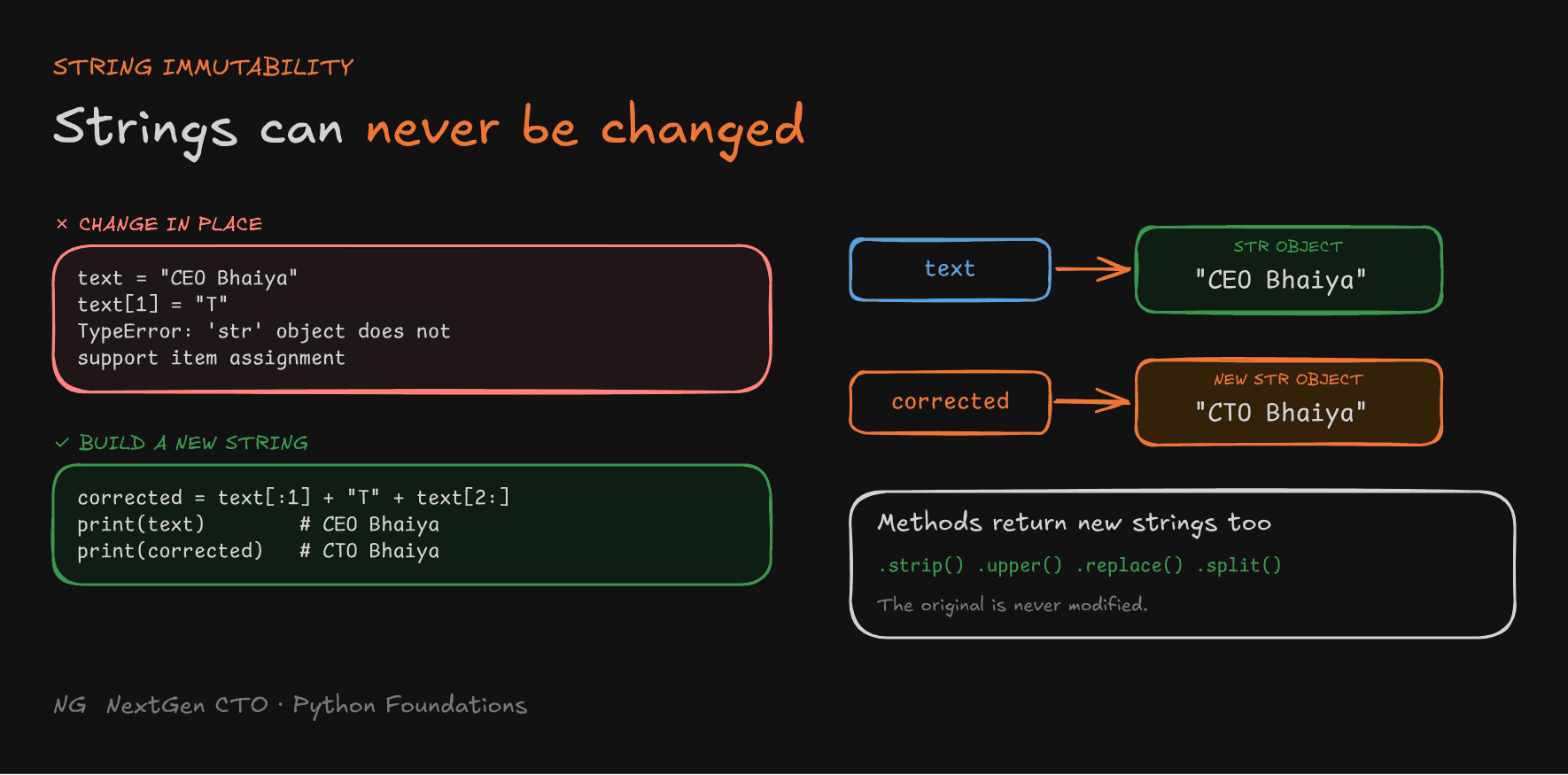
Strings are immutable: once a string object is created, its characters can never be changed.
text = "CEO Bhaiya"
text[1] = "T"
# TypeError: 'str' object does not support item assignment
To "change" a string, you build a new one:
text = "CEO Bhaiya"
corrected = text[:1] + "T" + text[2:]
print(text)        # CEO Bhaiya   (original unchanged)
print(corrected)   # CTO Bhaiya   (a new string)
Built-in String Methods
Python has many built-in methods for processing text. You call them with the dot (.) operator: text.method().
courses = "  DSA1,DSA2,DSA3  "

clean = courses.strip()          # 'DSA1,DSA2,DSA3'    removes outer spaces
upper = clean.upper()            # 'DSA1,DSA2,DSA3'    UPPERCASE
updated = clean.replace("DSA1", "Topic-wise DSA")
                                 # 'Topic-wise DSA,DSA2,DSA3'
course_list = clean.split(",")   # ['DSA1', 'DSA2', 'DSA3']
Every method returns a new string (or, for split(), a list). The original courses is unchanged, because it can't change.
Tip: you don't need to memorise every method. Run
help(str)ordir(str)to see them all.
String Formatting with f-strings
Joining values with + gets messy fast, and it breaks with numbers:
name = "Anuj"
age = 25
print("My name is " + name + " and my age is " + age)
# TypeError: can only concatenate str (not "int") to str
An f-string inserts values straight into text:
print(f"My name is {name} and my age is {age}")
# My name is Anuj and my age is 25- Put an
fbefore the opening quote. - Put variables inside
{ }. - You can also put expressions inside
{ }:
num_of_courses = 8
fees_per_course = 99
print(f"Order: {num_of_courses} courses. Total: {num_of_courses * fees_per_course}")
# Order: 8 courses. Total: 792
f-strings are easier to read, which fits the Zen of Python: readability counts.
Why Are Strings Immutable?
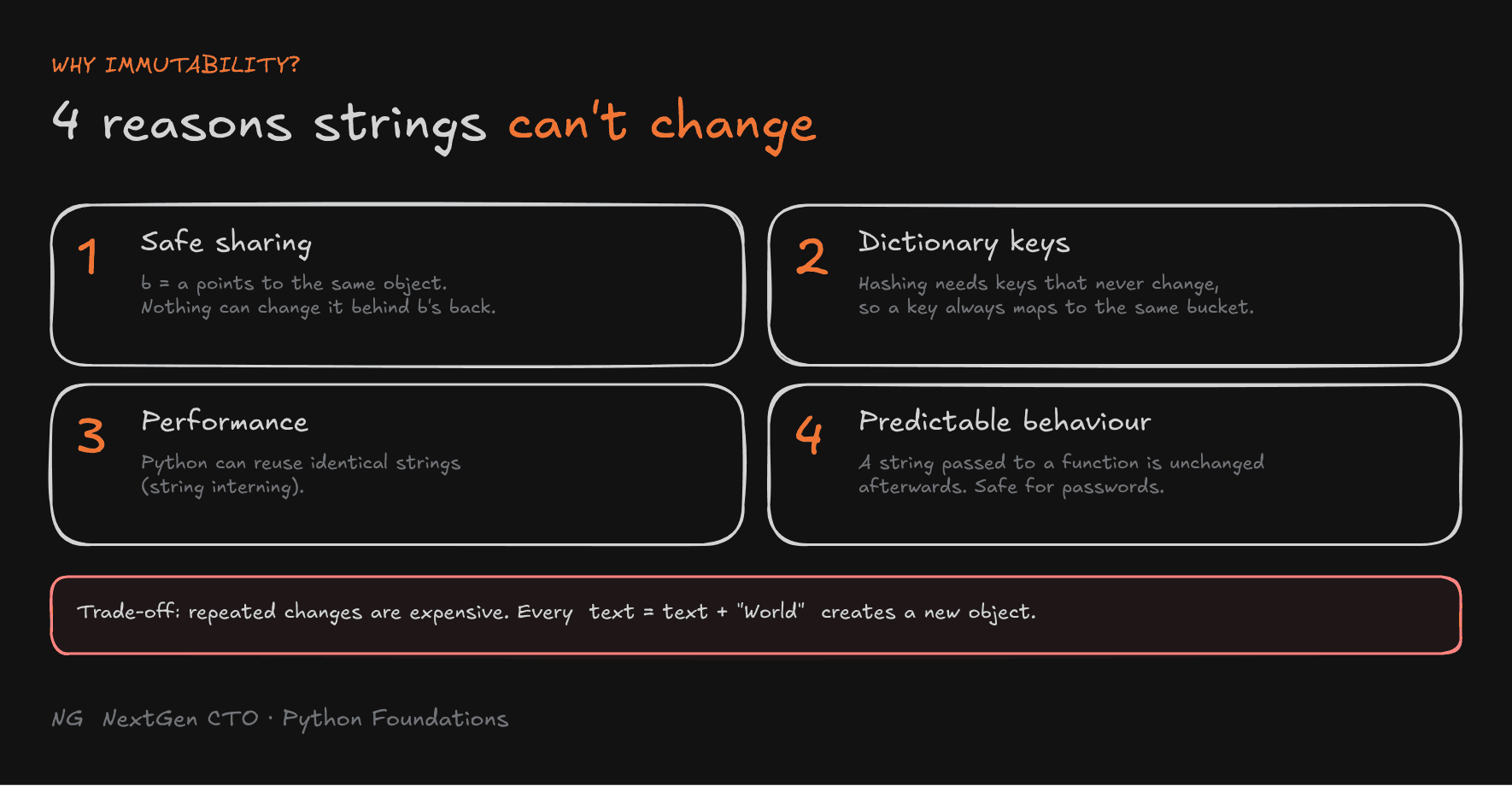
Changing one character took slicing and concatenation. So why design strings this way? There are four reasons:
1. Safe sharing of objects. With a = "Hello" and b = a, both labels point to one object. Since it can't change, nothing you do through a can surprise b.
2. Strings can be dictionary keys. Dictionaries use hashing to decide where each key is stored. A key's hash must never change, or Python would look in the wrong place. Immutable strings guarantee that.
student = {"name": "Anuj"}
print(student["name"])   # Anuj
3. Performance (string interning). Since equal strings can never diverge, Python can safely reuse one object:
best_channel_1 = "Paraya College"
best_channel_2 = "Paraya College"
print(best_channel_1 is best_channel_2)   # True
4. Predictable behaviour. Pass a string into a function and you know it will be the same string afterwards. That matters a lot for things like passwords.
The trade-off: repeated modification is expensive. Every text = text + "World" creates a new object. For heavy text building, there are better tools, which we'll cover later.

Part 3.4 — Operators and Expressions
Operators, Operands and Expressions
x = 10 + 5- Operator: a symbol or keyword that performs an operation (
+). - Operand: a value the operator works on (
10and5). - Expression: any piece of code that evaluates to a value (
10 + 5gives15).
Operators let you calculate, compare and combine values.
Arithmetic Operators
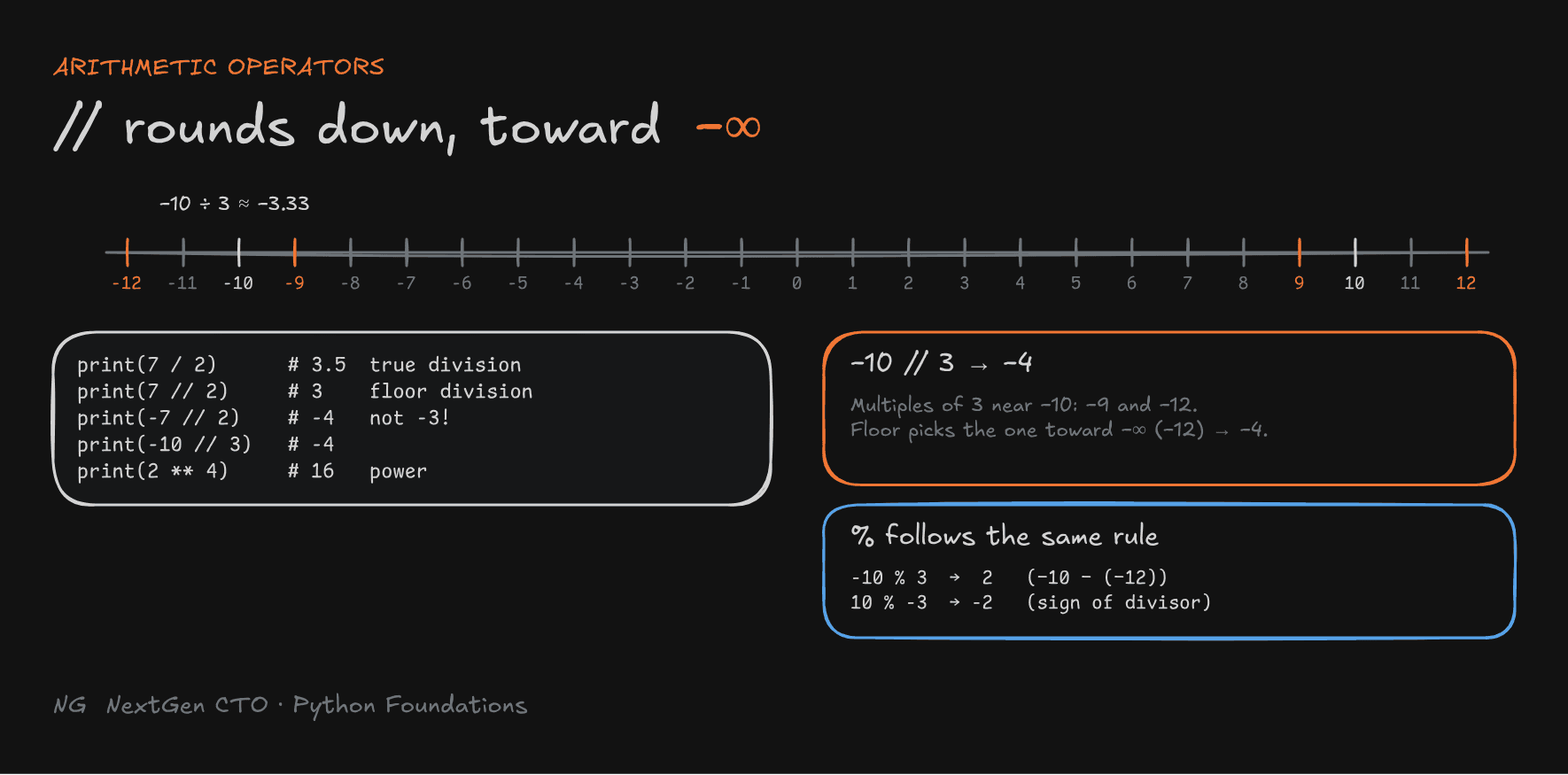
/ always gives a float. // rounds the result down, toward negative infinity. That's the part that trips people up with negative numbers:
print(7 // 2)     # 3
print(-7 // 2)    # -4, not -3
print(-10 // 3)   # -4
print(10 // -3)   # -4
Why −4? −10 ÷ 3 is about −3.33. Rounding down on the number line goes to −4, not −3. (C, C++ and Java round toward zero, so they give −3. Python is different.)
The remainder (%) follows that same floor-division rule. Python always keeps (a // b) * b + (a % b) == a:
print(10 % 3)     # 1
print(-10 % 3)    # 2     because -4 * 3 = -12, and -10 - (-12) = 2
print(10 % -3)    # -2    the remainder takes the sign of the divisor
Comparison Operators
Comparison operators compare two values. The result is always True or False. They're used in conditions and decision-making.
age = 20
print(age >= 18)   # True
print(age == 18)   # False
print(age != 18)   # True
Logical Operators
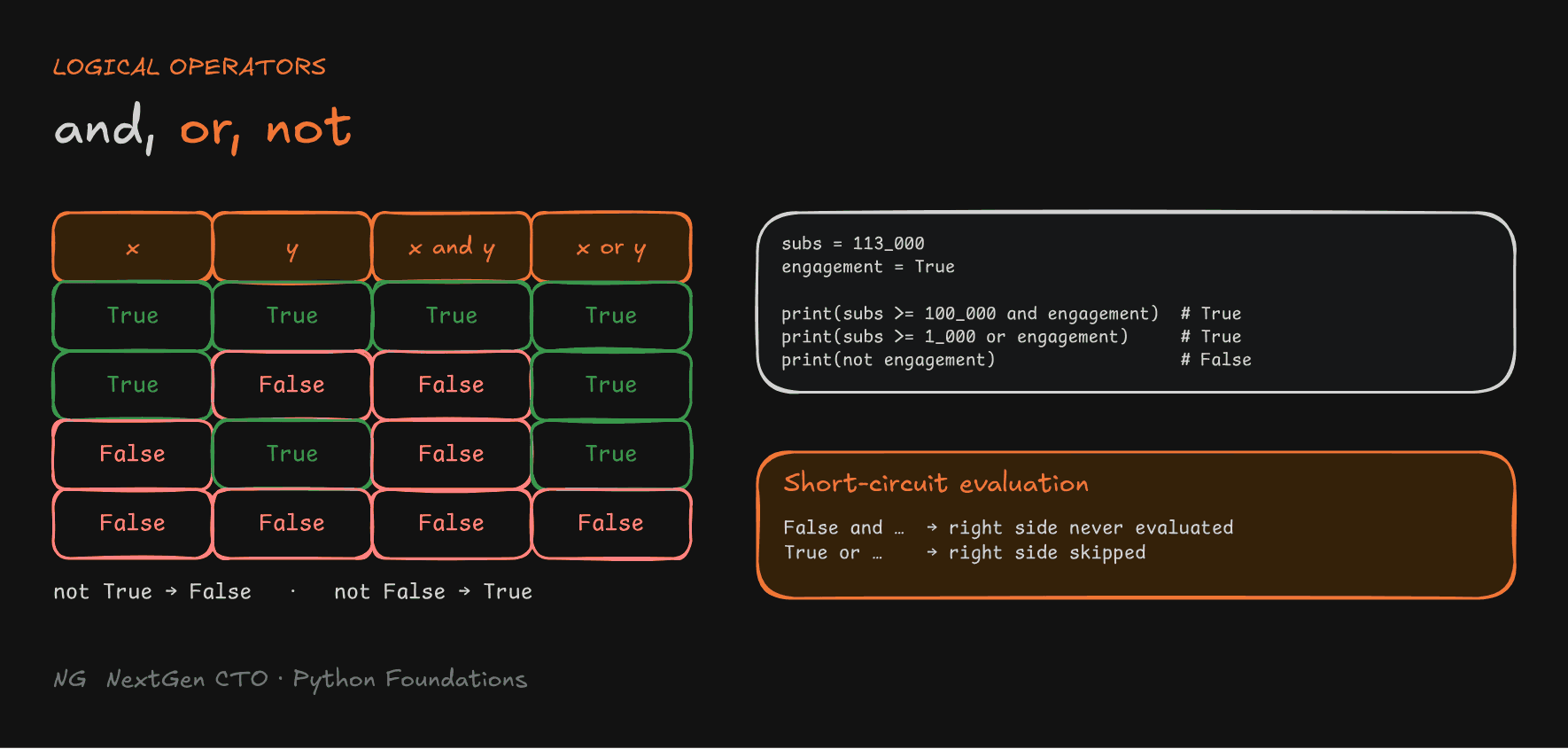
Logical operators combine or reverse conditions. Python has three: and, or and not.
andisTrueonly when both sides areTrue.orisTruewhen at least one side isTrue.notreverses the result:not TruegivesFalse.
subs = 113_000
engagement = True

print(subs >= 100_000 and engagement)   # True
print(subs >= 1_000 or engagement)      # True
print(not engagement)                   # False
Short-circuit evaluation: Python stops as soon as it knows the answer.
False and ...is alwaysFalse, so the right side is never evaluated.True or ...is alwaysTrue, so the right side is skipped.

Operator Precedence and Grouping
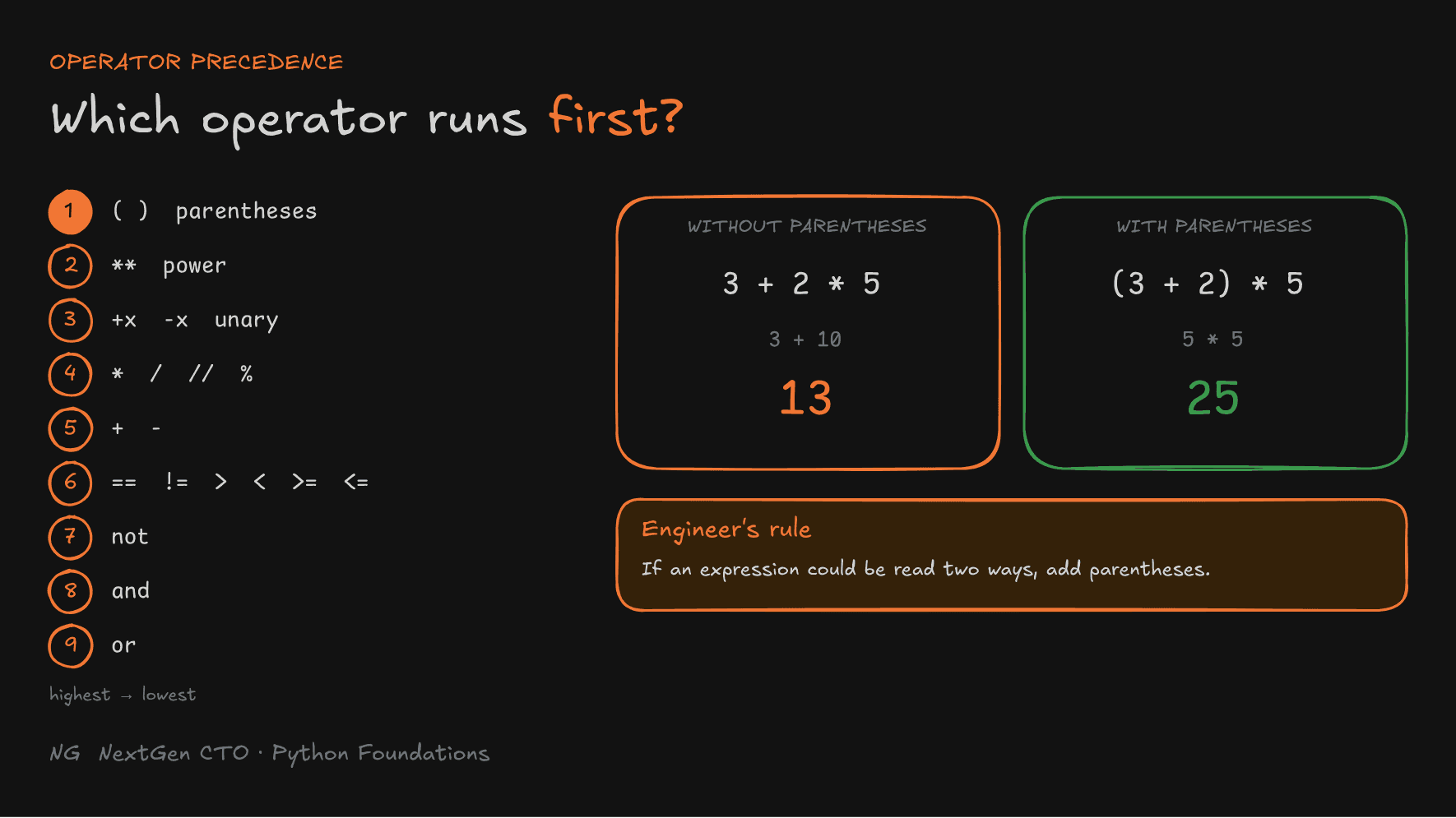
Precedence decides which operators bind more tightly, meaning which part of an expression runs first.
print(3 + 2 * 5)      # 13, not 25: * runs before +
print((3 + 2) * 5)    # 25: parentheses run first
print(10 + 5 * 2)     # 20
print((10 + 5) * 2)   # 30
From highest to lowest:
()parentheses**power- Unary
+x,-x *,/,//,%+,-- Comparisons:
==,!=,>,<,>=,<= notandor
Engineer's rule: don't make readers memorise this table. If an expression could be read two ways, add parentheses. They cost nothing and make your intent obvious.

Key Takeaways
Variables and types
- A variable is a label pointing to an object. The object has the type, not the variable.
==compares values,iscompares identity, andid()shows an object's identity. Use==for values.- Python is dynamically typed: no type declarations, and a label can be re-pointed to any object.
- Follow the naming rules, use snake_case, and never reuse built-in names like
print.
Numbers and booleans
inthas arbitrary precision.floatuses IEEE 754 64-bit and is approximate.boolisTrue/Falseand a subclass ofint.- Never compare floats with
==. Usemath.isclose()or a tolerance.
Strings
- Indexes start at 0, and negative indexes count from the end.
len()counts characters. - Slicing is
s[start:stop]: start is included, stop is excluded. - Strings are immutable.
+and every method return a new string. Use f-strings for readable formatting.
Operators
/gives a float,//floors toward negative infinity, and%follows the same rule.- Comparisons return booleans.
and,orandnotcombine them and short-circuit. *runs before+. When in doubt, use parentheses.
The main principle: know what your code does in memory, and make your rules obvious to the next reader.
Up next → Part 3.5: Type Conversion and Casting