
Python Fundamentals Series · Part 6 of 12
Python #5: Conditional Logic & Loops | From Fundamentals to Advanced Concepts
Python Foundations · Part 4.1–4.3 of 23
Conditional Logic and Loops: Teaching Your Code to Decide and Repeat
if, elif and else, compound conditions, the operator rule that silently breaks eligibility checks, and your first loop.

"Sab kuch AI karega toh tu kya karega… kam se kam padh hi le." If AI does everything, what will you do? At least study.
Until now, your programs ran every line from top to bottom. This part gives you control: run some lines only when a condition holds (4.1 Control statements), combine several conditions (4.2 Compound conditions), and repeat code until something changes (4.3 While loops).
Part 4.1 — Conditional Statements
What Is Flow Control?
By default, Python executes code from top to bottom. Conditional statements let your program make decisions: they run a block of code only if a condition is True, and skip it otherwise. They change the normal flow of execution.
Python gives you three keywords: if, elif and else.
if condition1:
    # runs if condition1 is True
elif condition2:
    # runs if condition1 is False and condition2 is True
else:
    # runs if none of the above were True
The if Statement
if runs a block only when its condition is True.
- The condition evaluates to
TrueorFalse, usually with a comparison operator. - A colon (
:) marks the start of the block. - Indentation decides which lines are inside the block. Python uses 4 spaces.
- If the condition is
False, the whole block is skipped.
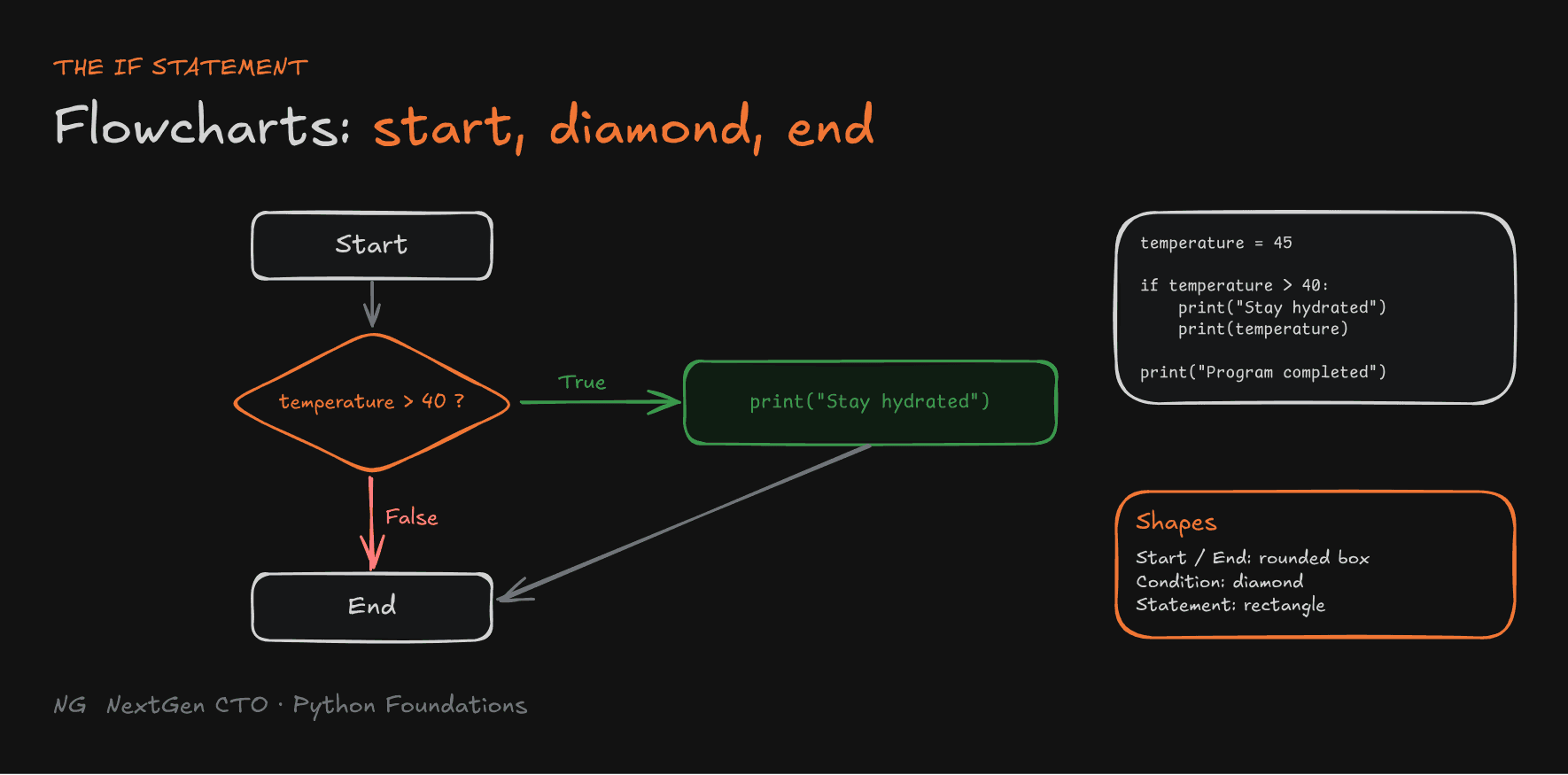
temperature = 45

if temperature > 40:
    print("Stay hydrated! The temperature is very high.")
    print(f"Temperature is {temperature}")

print("Program completed")   # not indented → always runs
With temperature = 45, all three lines print. Change it to 35 and only Program completed prints.
Drawing a Flowchart
Flowcharts help you plan and explain code. Three shapes are enough:
- Start and End boxes. Draw these first, every time.
- A diamond for a condition, with a True branch and a False branch.
- Rectangles for statements, connected by arrows.
You don't need exact code in the diamond. Plain English like "Is the temperature above 40?" works.

The else Statement
Use else when there are two possible paths. The if block runs when the condition is True, and the else block runs when it's False.
elsehas no condition of its own.- Exactly one of the two blocks runs.
age = 16

if age >= 18:
    print("Eligible to vote")
else:
    print("Not eligible to vote")
The elif Statement
elif is short for "else if", Python keeping things concise. Use it when you need more than two paths.
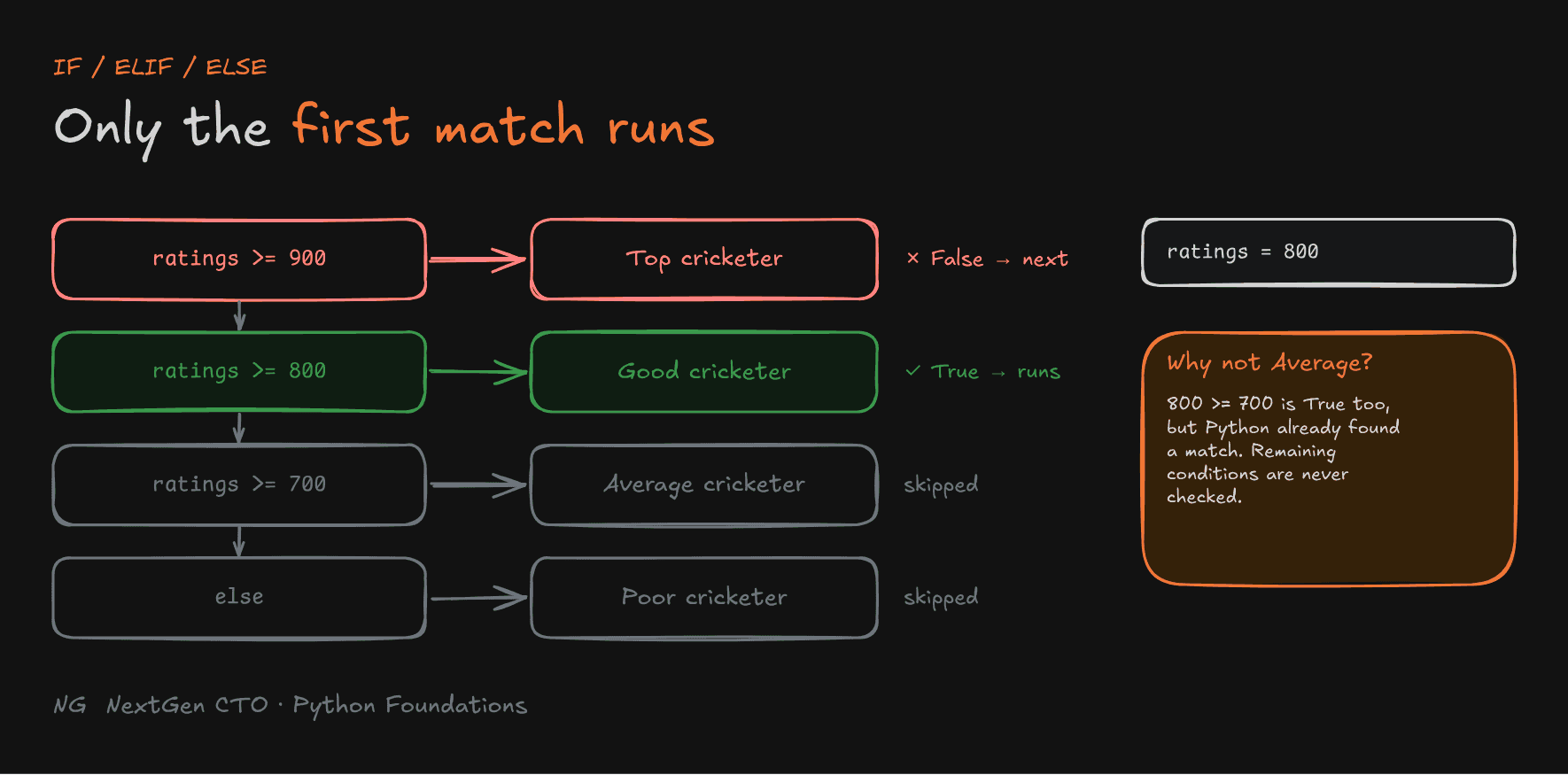
ratings = 800

if ratings >= 900:
    print("Top cricketer")
elif ratings >= 800:
    print("Good cricketer")
elif ratings >= 700:
    print("Average cricketer")
else:
    print("Poor cricketer")
Output: Good cricketer.
- Python checks conditions from top to bottom.
- Only the first matching block runs. The remaining conditions are skipped entirely.
elseis optional, and catches the case where nothing matched.
Notice that 800 >= 700 is also True, but Average cricketer never prints. Once a match is found, Python doesn't look further.

Nested Conditional Statements
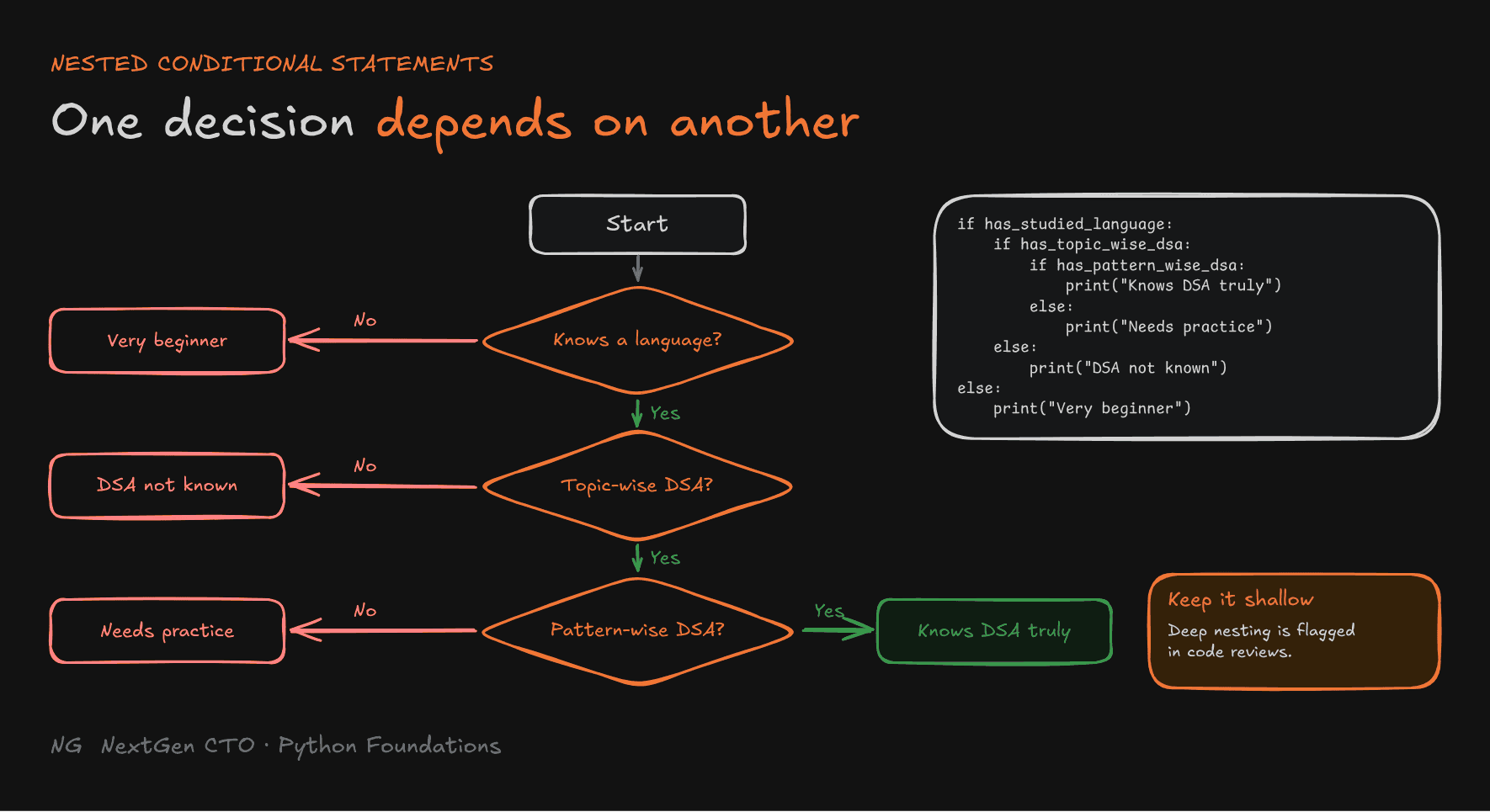
A conditional inside another conditional is called nesting. Use it when one decision depends on another: the inner condition is only checked if execution reaches it.
has_studied_language = True
has_studied_topic_wise_dsa = True
has_studied_pattern_wise_dsa = False

if has_studied_language:
    if has_studied_topic_wise_dsa:
        if has_studied_pattern_wise_dsa:
            print("Knows DSA truly")
        else:
            print("Knows DSA but needs practice")
    else:
        print("DSA not known yet")
else:
    print("A very, very beginner")
Output: Knows DSA but needs practice.
Trace it with one rule: if an if runs, its else doesn't. Each nested block needs one more level of indentation.
Production tip: deep nesting is hard to read and is flagged in code reviews. Keep nesting shallow. Compound conditions (next section) often let you flatten it.

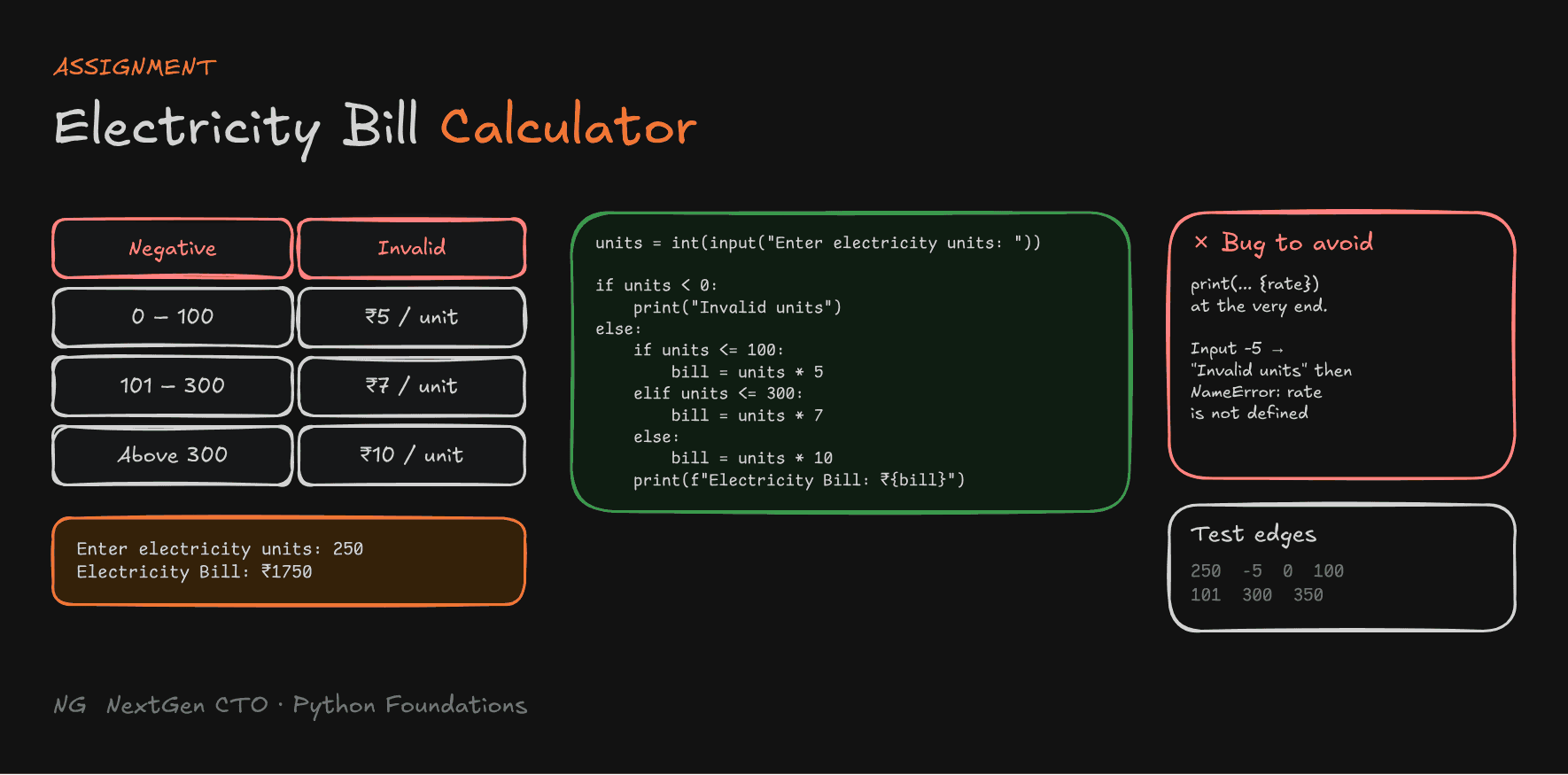
Assignment: Electricity Bill Calculator
In a company you're handed a spec (or a PRD) and asked to build exactly that. Here's yours.
Requirements
- Take the number of electricity units as input.
- If units are negative, display
Invalid units. - Apply the rate to all units consumed, and display the total bill.
Example
Enter electricity units: 250
Electricity Bill: ₹1750
A solution:
units = int(input("Enter electricity units: "))

if units < 0:
    print("Invalid units")
else:
    if units <= 100:
        bill = units * 5
    elif units <= 300:
        bill = units * 7
    else:
        bill = units * 10
    print(f"Electricity Bill: ₹{bill}")
Bug to avoid: a common version puts
print(f"Electricity Bill: ₹{rate}")at the very end, outside every block. Enter-5and it printsInvalid units, then crashes withNameError: name 'rate' is not defined, because the variable was never created. Print the bill only on the path where it was calculated.
Two more details:
elif units <= 300is enough. We only reach it whenunits > 100, sounits >= 101 andis redundant.- Calculating the bill in each branch and printing once avoids repeating
print()three times, which is redundant code.
Test it with 250, -5, 0, 100, 101, 300 and 350.

Part 4.2 — Compound Conditions
Combining Conditions
A compound condition combines two or more conditions with and, or and not into one True or False. Use it when a decision depends on several rules.
and:Trueonly when all conditions areTrue.or:Truewhen at least one condition isTrue.
age = 20
has_license = True

if age >= 18 and has_license:
    print("Can drive")
Negating Conditions with not
not reverses a truth value: not True is False, and not False is True. It's very useful when something is missing or disabled:
name = ""

if not name:          # "" is falsy, so not "" is True
    print("Name is missing")
is_supporting = False
if not is_supporting:
print("No lecture will come")Short-Circuit Evaluation
Python evaluates compound conditions left to right, and stops as soon as the result is known:
andstops at the firstFalse. The result can't becomeTrueanymore.orstops at the firstTrue. The result can't becomeFalseanymore.
t20 = True
odi = False
test_cricket = True

if t20 and odi and test_cricket:   # stops at odi; test_cricket is never checked
    print("Complete all-round player")
This saves unnecessary work, and it can prevent errors. If a later condition would have called a function that crashes, it's never reached.
Precedence and Grouping: A Real Bug
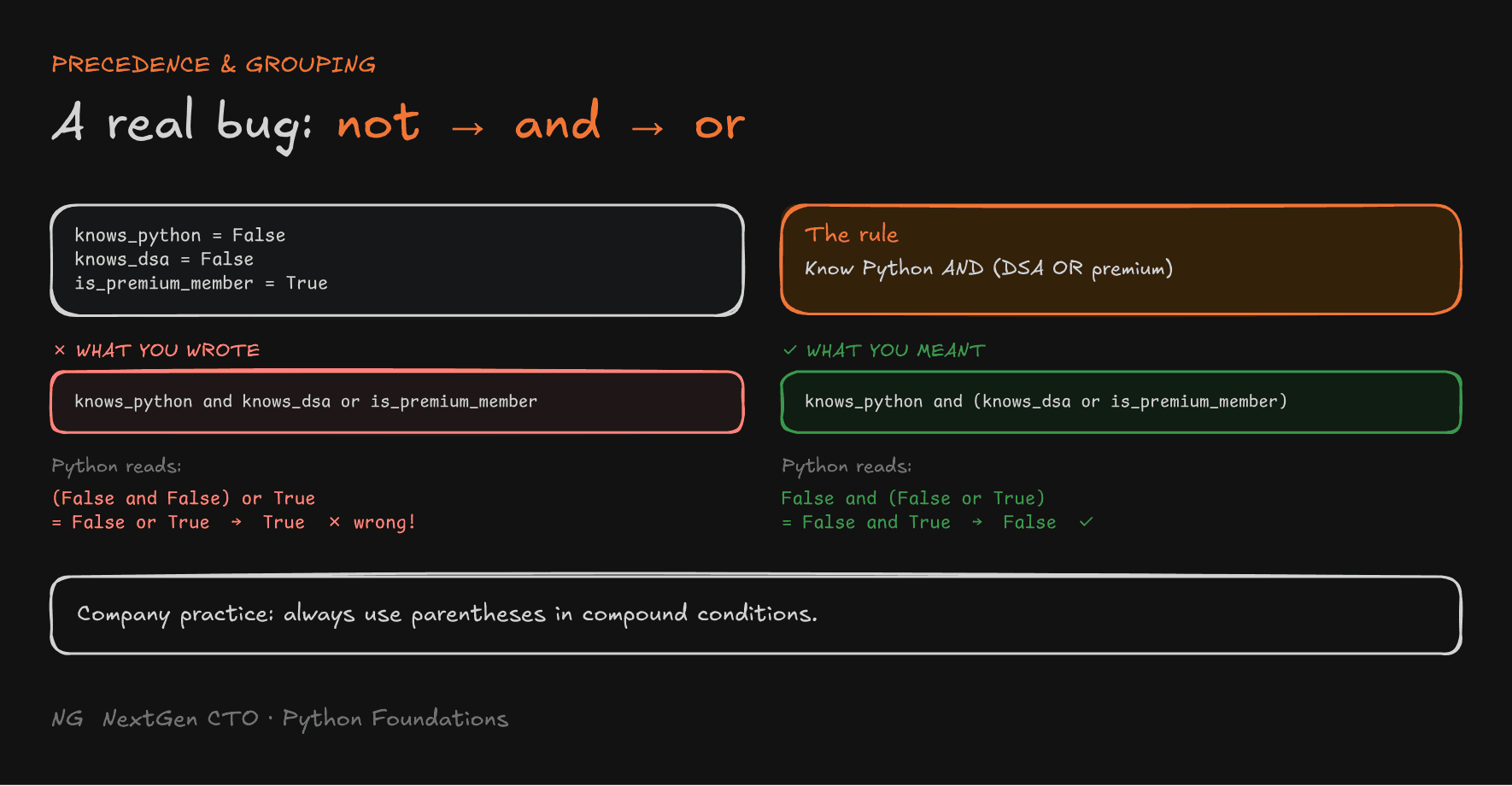
Logical operators have a fixed priority: not first, then and, then or. Ignore it and you get bugs that look correct.
The rule: a student can enter the contest if they know Python, AND they either know DSA or are a premium member.
knows_python = False
knows_dsa = False
is_premium_member = True

# ❌ Looks right, but isn't
if knows_python and knows_dsa or is_premium_member:
    print("Eligible for contest")      # ← prints! Wrong.
Because and runs before or, Python reads it as (knows_python and knows_dsa) or is_premium_member, which is False or True, so True. A student who doesn't know Python gets in.
# ✅ Group what you mean
if knows_python and (knows_dsa or is_premium_member):
    print("Eligible for contest")
else:
    print("Not eligible for contest")  # ← correct
In companies, people use parentheses in compound conditions as standard practice. They make the intent obvious, and you never have to rely on remembering precedence.

and / or Return Operand Values
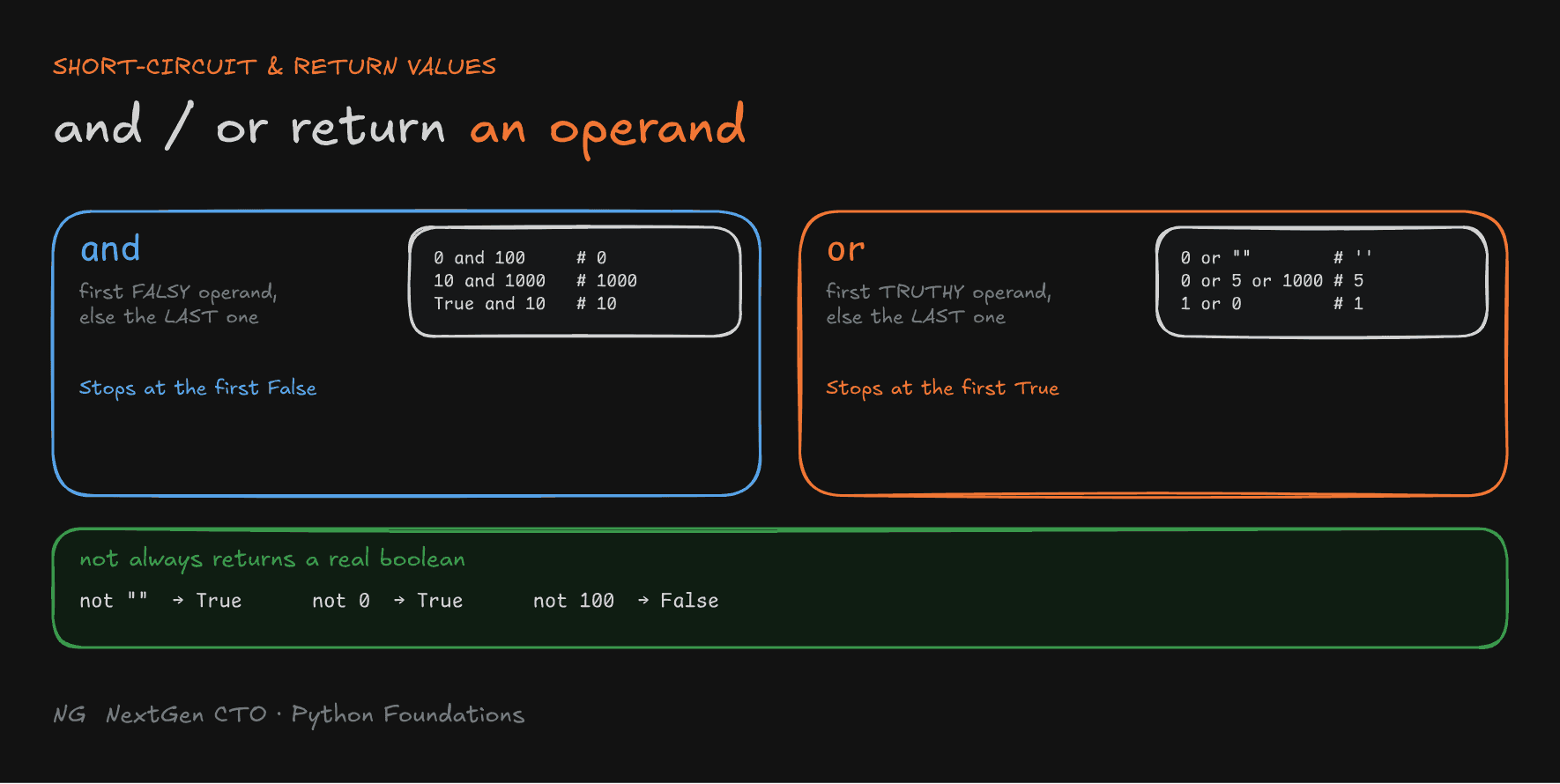
Here's a rule many people don't know: and and or don't always return True or False. They return one of the operands.
andreturns the first falsy operand. If all are truthy, it returns the last one.orreturns the first truthy operand. If all are falsy, it returns the last one.
print(0 and 100)        # 0
print(10 and 1000)      # 1000
print(True and 10)      # 10

print(0 or "")          # ''  (all falsy → the last one)
print(0 or 5 or 1000)   # 5   (first truthy; 1000 is never checked)
not always returns a real boolean:
print(not "")     # True
print(not 0)      # True
print(not 100)    # False
Part 4.3 — While Loops
What Is a Loop?
Say you have a list of 1,000 students and need to print each one's details. You wouldn't write the same code 1,000 times. A loop runs the same code repeatedly. Each run of the loop body is called an iteration.
Python has two loops: while and for. This part covers while.
The while Loop
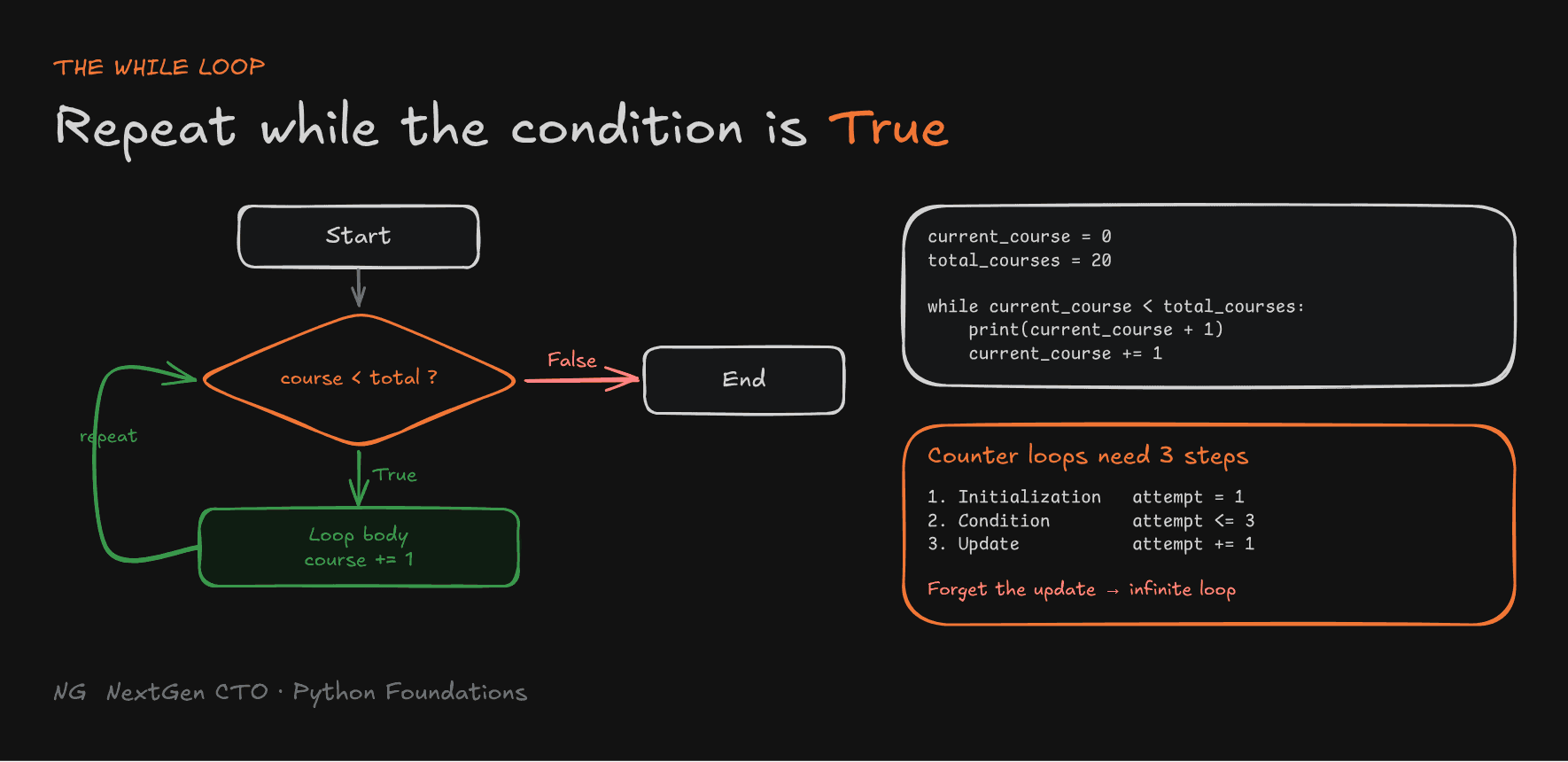
A while loop repeats as long as its condition is True. It's the right choice when you don't know the number of iterations in advance.
current_course = 0
total_courses = 20

print("Placement series started")

while current_course < total_courses:
    print(f"Currently running course {current_course + 1}")
    current_course = current_course + 1

print("Placement series completed")
This prints courses 1 to 20. When current_course reaches 20, 20 < 20 is False, and the loop ends.
whilestarts the loop, and the condition decides whether it runs.- The loop body is indented under the colon.
- The condition is checked before every iteration.
- If the condition is
Falsefrom the start, the loop never runs.

Controlled Iteration with Counters
When something should repeat a fixed number of times, like retrying a failed network request up to 3 times, use a counter. Every counter loop has three steps:
- Initialization: set the starting value, once.
- Condition: decide when to stop.
- Update: change the counter each iteration.
attempt = 1               # 1. initialization
max_attempts = 3

while attempt <= max_attempts:      # 2. condition
    print(f"Attempt {attempt}")
    attempt = attempt + 1           # 3. update

print("All attempts done")
Infinite Loops
If the condition never becomes False, the loop runs forever. That's an infinite loop. The most common cause is forgetting the update step:
attempt = 1
while attempt <= 3:
    print(f"Attempt {attempt}")
    # forgot: attempt = attempt + 1  → runs forever
An infinite loop keeps consuming CPU cycles and can make your program unresponsive. Always make sure your loop has a valid stopping condition. If you're stuck in one, press Ctrl + C.
Sentinel Values and the Priming Read
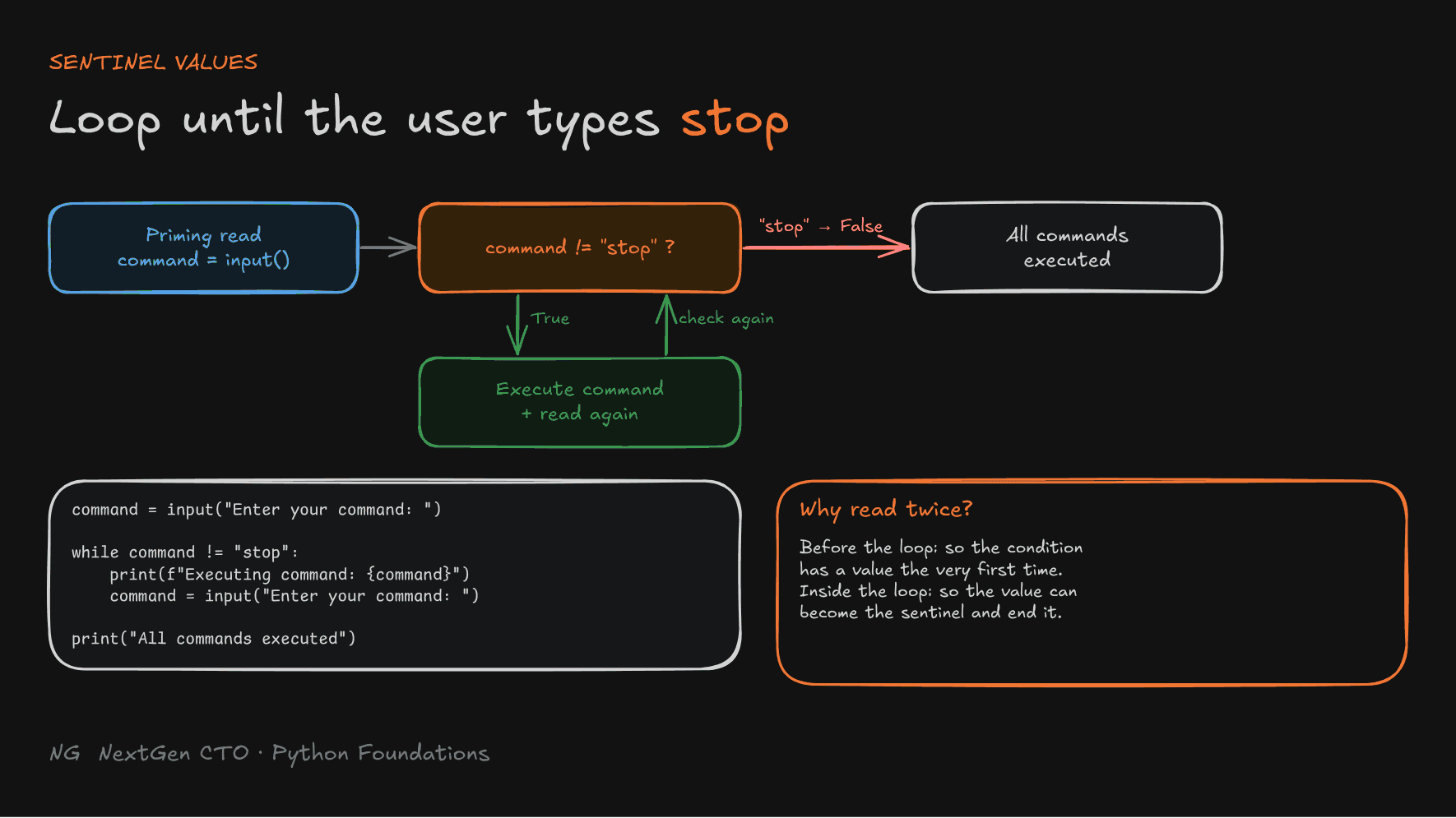
Remember games that kept asking for input until you typed stop? That special value is a sentinel value: it signals the loop to end. Common ones are stop, exit and -1. The number of iterations is unknown, which is exactly where while shines.
command = input("Enter your command: ")      # priming read

while command != "stop":
    print(f"Executing command: {command}")
    command = input("Enter your command: ")  # read again inside the loop

print("All commands executed")
Two reads are needed:
- The priming read, before the loop, so the condition has a value to check the very first time.
- The read inside the loop, so the value can eventually become the sentinel and end the loop.

When to Use while
Use while when you don't know how many iterations you need: waiting for a sentinel, retrying until success, running until a condition changes. while is an entry-controlled loop: the condition is checked before the body runs, so the body may run zero times.
Key Takeaways
if,elifandelsechange the top-to-bottom flow. Only the first matching block runs.- Indentation decides what's inside a block. Keep nesting shallow.
- Flowcharts: Start/End boxes, diamonds for conditions, rectangles for statements.
- Precedence is
not→and→or. Use parentheses to say what you mean. andandorshort-circuit and return operand values.notalways returns a boolean.- A
whileloop repeats while its condition isTrue. Use it when the iteration count is unknown. - Counter loops need initialization, condition and update. Forget the update and you get an infinite loop.
- Sentinel loops need a priming read before the loop and another read inside it.
The main principle: make every path through your code intentional, and test the edge cases.
Up next → Part 4.4: For Loops